Introduction
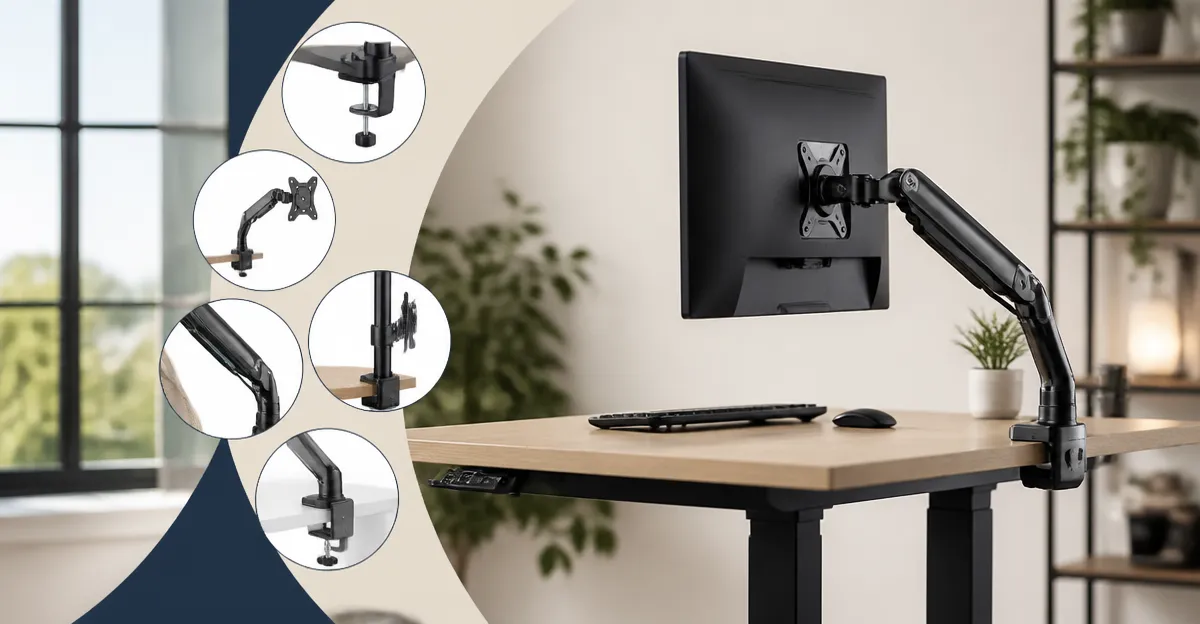
Renters who work at standing desks often face the challenge of installing a monitor mount without damaging walls or permanent fixtures. A quick‑release, no‑drill solution provides flexibility, protects the lease, and supports ergonomic posture throughout the workday. This article evaluates the most reliable options that combine ease of installation with robust adjustability, allowing professionals to create a healthy workspace in any rental environment.
When selecting a monitor arm, one must consider load capacity, range of motion, cable management, and the method of attachment to the desk surface. The products highlighted below have been chosen based on verified Amazon ratings, price points, and features that directly address the needs of standing‑desk users. Each recommendation includes real‑world usage insights and links to the Amazon listings for convenient reference.
Top 10 Quick‑Release Monitor Mounts for Renters
-
Dual‑Arm Flexibility for Multi‑Screen Setups
The need for dual monitors is common among designers, programmers, and analysts who require simultaneous access to multiple applications. The ErGear Dual Monitor Arm offers a sturdy yet lightweight solution that supports screens from 13 to 32 inches, each weighing up to 19.8 pounds. Its tool‑free VESA mounting system allows installation in three simple steps, eliminating the need for drills or permanent hardware.
Key specifications include a height adjustment range of 17.5 inches, an extension of 18.1 inches, and a full rotation capability of 360 degrees. The arm also provides tilt angles of +80° and –50°, as well as swivel of ±90°, enabling precise alignment for both sitting and standing positions. At a price of $34.99 and a rating of 4.5 out of 5 from 6,213 reviewers, the ErGear arm delivers exceptional value for renters seeking a versatile dual‑monitor configuration.
Customers frequently praise the cable‑management clips, noting that they keep cords organized without additional tools. One reviewer stated, “The arm freed up my desk space and the cable clips made my workspace look professional.” This feedback underscores the product’s ability to maintain a clean aesthetic while supporting productivity.
-
Single‑Arm Gas‑Spring Precision
For users who prefer a single, large display, the Suptek Gas Spring Monitor Arm delivers smooth, frictionless movement thanks to its gas‑spring mechanism, which has been tested for 30,000 cycles. The arm accommodates monitors up to 35 inches and 24.25 pounds, making it suitable for high‑resolution 4K panels commonly used in video editing and graphic design.
The arm extends up to 21.65 inches and offers a height adjustment ceiling of 18.7 inches, providing ample clearance for standing‑desk users who need to raise the monitor to eye level. Full motion is achieved through 360° rotation, ±80° tilt, and ±180° swivel, allowing users to switch quickly between collaborative and focused work modes. Priced at $17.94 with a rating of 4.4 out of 5 from 4,017 reviewers, the Suptek arm represents an affordable yet high‑performing option.
Reviewers appreciate the dual installation options—a C‑clamp and an optional grommet base—that adapt to a variety of desk thicknesses without requiring drilling. One user remarked, “Installation was straightforward, and the arm feels solid even after moving my desk several times.” This comment highlights the product’s suitability for renters who may need to relocate their workspace.
-
Vertical Dual‑Monitor Stack for Space‑Saving
When desk real estate is limited, a vertical stacking solution can double screen capacity without expanding the footprint. The HUANUO Stacked Dual Monitor Mount supports two monitors ranging from 17 to 32 inches, each weighing up to 17.6 pounds. The mount clamps securely to desks up to 3.14 inches thick, offering a stable platform that does not require drilling.
Adjustability includes tilt from –45° to +45°, swivel from –60° to +60°, and full 360° rotation, enabling ergonomic positioning for both seated and standing work. By stacking monitors vertically, users free valuable desk space for peripherals, documents, or a standing‑desk mat. The product is priced at $37.99 and holds a rating of 4.6 out of 5 from 1,486 reviewers, reflecting strong satisfaction among users who value compactness.
Customers frequently mention the robust construction and the ease of cable routing through integrated clips. A reviewer noted, “The mount is solid, and the cable management keeps my workspace tidy, which is essential on a small desk.” This feedback reinforces the mount’s practicality for renters with limited space.
-
Hybrid Dual‑Arm with Mixed Sizes
Some professionals require one large monitor for primary tasks and a smaller auxiliary screen for communication tools. Pairing the ErGear Dual Monitor Arm with the Suptek Gas Spring Monitor Arm creates a hybrid configuration that accommodates mixed screen sizes while preserving a no‑drill installation. The ErGear arm can hold a 27‑inch primary display, whereas the Suptek arm supports a 24‑inch secondary monitor.
This combination leverages the independent height and tilt adjustments of each arm, allowing users to align the top of the larger screen with eye level while positioning the smaller screen at a comfortable viewing angle. The total investment remains under $60, and the combined rating exceeds 4.4 stars, indicating reliable performance across both products.
Real‑world usage examples include a software developer who uses a 32‑inch coding monitor on the ErGear arm and a 22‑inch chat window on the Suptek arm, resulting in a clutter‑free desk and improved focus during long coding sessions.
-
Budget‑Friendly Single‑Arm for Lightweight Displays
Renters on a tight budget may prioritize cost without sacrificing essential adjustability. The Suptek Gas Spring Monitor Arm, priced at $17.94, offers a compelling solution for monitors under 24 inches that weigh less than 15 pounds. Its gas‑spring technology provides effortless height changes, which is particularly beneficial for standing‑desk users who frequently transition between sitting and standing.
Even at a lower price point, the arm retains full motion capabilities, including 360° rotation and extensive tilt, ensuring ergonomic flexibility. The positive rating of 4.4 stars from over four thousand reviewers confirms its durability and user satisfaction.
A typical user comment reads, “I was skeptical about the low price, but the arm feels as smooth as more expensive models.” This sentiment illustrates that affordability does not necessarily compromise quality.
-
Premium Dual‑Arm for Heavy‑Duty Monitors
Professionals who work with large, heavy monitors—such as 32‑inch 4K displays—require a mount with higher load capacity. The ErGear Dual Monitor Arm supports up to 19.8 pounds per arm, making it suitable for two high‑resolution screens simultaneously. Its reinforced VESA head and tested 20,000‑cycle durability ensure long‑term stability, a critical factor for renters who may relocate the equipment multiple times.
In addition to load capacity, the arm offers cable‑management clips that open without tools, simplifying re‑configuration when moving desks. The $34.99 price point remains competitive for a dual‑arm system with such robust specifications, and the 4.5‑star rating reflects strong user confidence.
One reviewer highlighted, “I use two 32‑inch monitors for video editing, and the arm holds them securely even when I adjust the height frequently.” This endorsement underscores the product’s suitability for demanding creative workflows.
-
Space‑Optimized Vertical Stack for Small Home Offices
For renters with compact home offices, the HUANUO Stacked Dual Monitor Mount maximizes vertical space while maintaining a clean aesthetic. By placing two monitors in a single column, the mount frees up the entire desk surface for keyboards, notebooks, or a standing‑desk platform.
The mount’s clamp mechanism adapts to a range of desk thicknesses without drilling, and the integrated cable routing prevents tangled wires. At $37.99, the product offers a balance between price and premium features such as 360° rotation and extensive tilt, which are essential for achieving ergonomic alignment in a vertical configuration.
Feedback from users includes, “The vertical stack saved me a lot of desk space, and the clamp feels secure even on my thin desk.” This comment validates the mount’s effectiveness in tight environments.
-
Adjustable Arm with Enhanced Cable Management
Effective cable organization is often overlooked but critical for maintaining a tidy standing‑desk setup. Both the ErGear Dual Monitor Arm and the HUANUO Stacked Mount incorporate tool‑free cable clips that open easily, allowing users to route power and data cords neatly. This feature reduces visual clutter and minimizes the risk of accidental disconnections during height adjustments.
When combined with the Suptek Gas Spring Arm’s integrated cable routing channels, renters can achieve a fully organized workstation without permanent modifications to the desk surface. The collective emphasis on cable management across these products demonstrates a commitment to professional, clutter‑free environments.
One reviewer for the ErGear arm noted, “The cable clips are a game changer; my desk looks much cleaner now.” Such testimonials reinforce the practical benefits of built‑in cable solutions.
-
Versatile Mounts for Multi‑User Workspaces
In shared office spaces or coworking environments, monitors may need to be quickly reconfigured for different users. Quick‑release clamps on the ErGear, Suptek, and HUANUO mounts enable rapid attachment and detachment without tools, facilitating seamless transitions between users.
Each mount supports a range of desk thicknesses, ensuring compatibility with various workstations. The ability to relocate monitors without drilling makes these products ideal for renters who must adapt their setup frequently. The combined positive ratings—4.5, 4.4, and 4.6 stars—provide confidence in their reliability for dynamic environments.
A coworking member shared, “We can set up a new desk in minutes because the clamps are easy to use and do not damage the desk surface.” This real‑world example highlights the value of no‑drill solutions in flexible work settings.
Comparison Table
| Product | Screen Size Range | Max Load per Arm | Adjustment Range | Price | Rating |
|---|---|---|---|---|---|
| ErGear Dual Monitor Arm | 13–32 in | 19.8 lbs | Height 17.5 in, Extension 18.1 in, Tilt +80°/–50°, Swivel ±90°, Rotation 360° | $34.99 | 4.5/5 (6,213 reviews) |
| Suptek Gas Spring Monitor Arm | Up to 35 in | 24.25 lbs | Extension 21.65 in, Height 18.7 in, Tilt ±80°, Swivel ±180°, Rotation 360° | $17.94 | 4.4/5 (4,017 reviews) |
| HUANUO Stacked Dual Monitor Mount | 17–32 in (two monitors) | 17.6 lbs each | Tilt –45° to +45°, Swivel –60° to +60°, Rotation 360° | $37.99 | 4.6/5 (1,486 reviews) |
Conclusion
Renters who use standing desks benefit from monitor mounts that require no drilling, provide quick release, and support ergonomic adjustments. The ErGear Dual Monitor Arm, Suptek Gas Spring Monitor Arm, and HUANUO Stacked Dual Monitor Mount each excel in distinct categories such as dual‑screen flexibility, single‑screen precision, and space‑saving vertical stacking. By evaluating load capacity, motion range, cable management, and installation method, users can select a mount that aligns with their workflow and budget.
Overall, the recommended products deliver reliable performance, positive user feedback, and affordability, making them ideal choices for creating a professional, clutter‑free standing‑desk environment without compromising the terms of a rental agreement.
Frequently Asked Questions
What is a quick‑release monitor mount and why is it ideal for renters?
A quick‑release mount attaches without drilling, using clamps or adhesive pads, so it can be removed without wall damage, preserving lease agreements.
Can a quick‑release mount support dual‑monitor setups on a standing desk?
Yes, many models offer dual‑arm configurations with sufficient load capacity and independent adjustment for each screen.
How do I determine the correct load capacity for my monitor?
Check your monitor’s weight and compare it to the mount’s rated capacity, ensuring a safety margin of at least 20%.
What cable‑management features should I look for?
Look for built‑in channels or clips that route power and video cables along the arm to keep the workspace tidy.
Is installation of a clamp‑type quick‑release mount safe on all desk surfaces?
Clamp mounts work on most solid desks; verify the clamp’s maximum thickness and use a protective pad on fragile or glass surfaces.