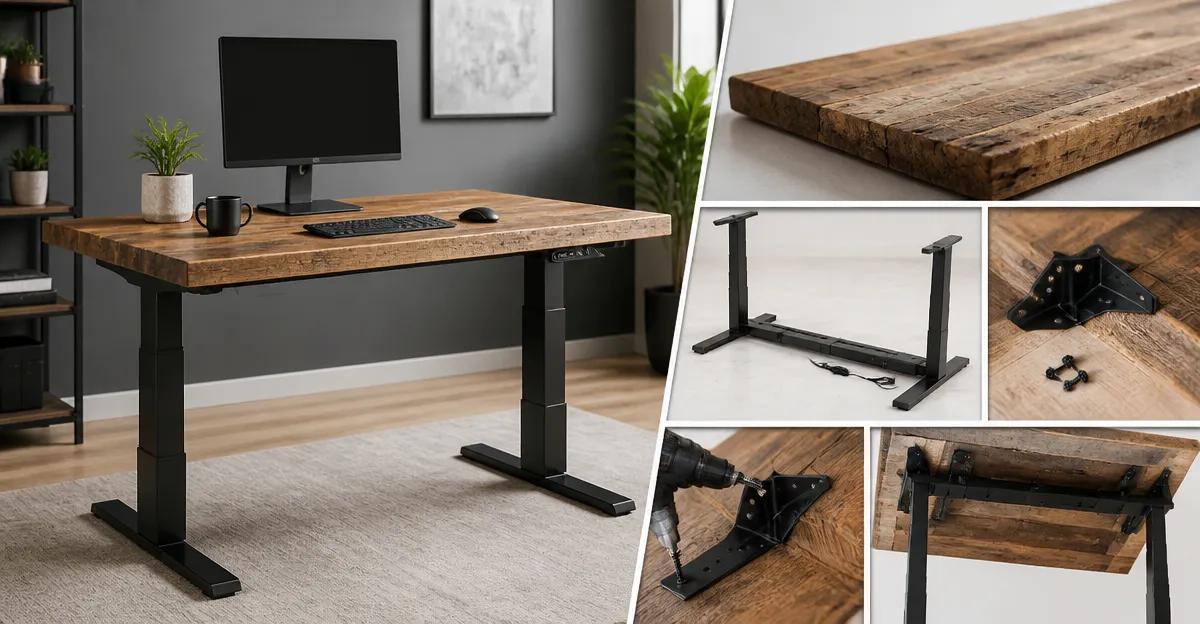
Introduction
This guide explains how to transform a reclaimed wood tabletop into a high‑performance sit‑stand workstation. Readers will discover how to select the right electric desk frame, reinforce the tabletop corners, and achieve a polished finish that supports multiple monitors and heavy peripherals. The process combines durability, ergonomics, and aesthetic appeal, making it valuable for home offices, creative studios, or shared workspaces.
By following each step, one can avoid common pitfalls such as wobble, insufficient load capacity, or unsightly cable clutter. The instructions draw on real‑world feedback from verified purchasers, ensuring that the recommended tools meet the demands of everyday use.
What You'll Need
- Reclaimed wood tabletop (minimum 3/4" thickness for stability)
- Electric standing‑desk frame – choose one of the following:
- VIVO Dual Motor Standing Desk Frame
- ErGear Dual Motor Desk Legs
- HUANUO Dual Motor Standing Desk Frame
- Corner reinforcement brackets – either stainless‑steel or metal braces:
- Wood screws (included with brackets)
- Power drill or screwdriver
- Level and measuring tape
- Cable management tray (often included with frames)
Step 1: Prepare the Reclaimed Wood Tabletop
Begin by inspecting the reclaimed slab for warping, cracks, or loose knots. Sand the surface to a smooth finish, then apply a protective sealant such as polyurethane to prevent moisture absorption. A thickness of at least 3/4" is recommended because the VIVO Dual Motor Standing Desk Frame supports tabletops between 3/4" and thicker, ensuring the load is distributed evenly across the steel columns.
The VIVO frame is rated for 220 lb capacity, features a 1" per second lift speed, and includes three memory presets. Its solid steel construction and leveling feet make it suitable for heavier reclaimed wood, which often weighs more than standard MDF surfaces.
Measure the tabletop dimensions and verify they fall within the frame's recommended length of 40"‑77" and width of 23"‑43". If the slab exceeds these limits, consider the ErGear Dual Motor Desk Legs, which accommodate lengths up to 90" and widths up to 31.5".
Step 2: Reinforce Corners with Brackets
Reclaimed wood often has uneven grain that can loosen over time. Installing corner braces prevents racking and adds rigidity, especially when the desk will be raised and lowered frequently.
For a discreet aesthetic, the FATLODA Corner Brackets 18 Pack provide stainless‑steel L‑brackets with self‑tapping 16 mm screws. Each bracket measures 40 mm × 40 mm × 16 mm, and the package includes 72 screws, enough for multiple reinforcement points. Reviewers praise their sturdy feel and ease of installation.
If a more robust triangular gusset is preferred, the Paoleju L Corner Brackets 10 Pack feature a one‑piece triangle design that resists twisting. The three‑surface flush contact eliminates gaps that cause squeaking, making them ideal for chairs or tables that experience dynamic loads.
To install, position each bracket on the interior corner of the tabletop, ensuring the long side aligns with the edge. Pre‑drill pilot holes if the wood is dense, then drive the supplied screws until the bracket sits flush without over‑tightening, which could split the wood.
Step 3: Assemble the Electric Desk Frame
Unbox the chosen frame and lay out all hardware. Both VIVO and ErGear provide clear instructions; however, the HUANUO Dual Motor Standing Desk Frame stands out for its automotive‑grade cold‑rolled steel, 265 lb capacity, and a 51.2‑inch extension cord that simplifies controller placement on larger tops.
Follow these sub‑steps:
- Attach the two telescopic legs to the crossbars using the supplied bolts. Ensure the legs are fully extended to the lowest height (approximately 28‑30") before securing.
- Connect the power cable to a nearby outlet; the long cord prevents the controller from being forced into an inconvenient spot.
- Install the cable management tray underneath the frame. This tray will later hide power strips and monitor cords, keeping the workspace tidy.
- Use a level to verify that the frame sits square on the floor. Adjust the leveling feet until all corners read within 0.5" of each other.
Both VIVO and ErGear feature dual‑motor lift systems that move at 1" per second, while HUANUO completes a full height range in 20 seconds. All three models operate quietly, a point emphasized in multiple positive reviews.
Step 4: Attach the Tabletop to the Frame
With the frame securely upright, position the prepared tabletop on top, aligning the pre‑drilled holes of the brackets with the frame's mounting points. Most frames include pre‑drilled slots or mounting plates; if not, use the provided L‑brackets as anchor points.
Secure the tabletop using the longer wood screws supplied with the corner brackets (or purchase matching 2‑inch wood screws). Drive each screw through the bracket into the frame's metal base, ensuring a tight but non‑stripping connection. This method distributes the load across the entire frame, preventing localized stress.
After fastening, test the lift function by raising the desk to its highest setting. Observe for any wobble; if present, double‑check that all screws are tightened and that the brackets are flush. The memory presets on each frame allow you to save preferred sitting and standing heights, facilitating quick transitions throughout the day.
Step 5: Organize Cables and Perform Final Adjustments
Route power strips and peripheral cables into the built‑in cable management tray. The ErGear frame includes a dedicated tray and clips, while HUANUO provides two headphone hooks and a tray, and VIVO offers optional zip‑tie accessories. Secure cords with zip‑ties or Velcro straps to avoid dangling wires that could interfere with the lift mechanism.
Finally, calibrate the height memory settings. Place the desk at a comfortable sitting height (typically 28"‑30" for most users) and press the corresponding memory button. Repeat for standing height (around 40"‑45" depending on user height). This ensures that the desk returns to exact positions with a single press, enhancing ergonomic consistency.
Tips & Pro Tips
- Weight Distribution: Place heavier items such as monitors toward the center of the tabletop to maintain balance.
- Floor Protection: If the office floor is hardwood, attach felt pads to the leveling feet to prevent scratches.
- Extra Reinforcement: For exceptionally long reclaimed slabs, add a third set of brackets midway along each side.
- Quiet Operation: Both VIVO and ErGear frames are praised for silent lifts; however, placing a thin rubber mat between the frame and tabletop can further dampen any minor vibrations.
- Future Expansion: The HUANUO frame's dual‑beam design accommodates desktops up to 90" × 31.5", allowing you to replace the tabletop later without changing the frame.
Troubleshooting
| Problem | Possible Cause | Solution |
|---|---|---|
| Desk wobbles at full height | Uneven floor or loose screws | Adjust leveling feet, retighten all frame bolts, and verify bracket installation. |
| Motor hums loudly | Obstructed lift path or overloaded weight | Remove excess load, ensure nothing is caught under the frame, and re‑calibrate the motor by powering off for 30 seconds. |
| Memory presets not saving | Power interruption during programming | Press and hold the desired preset button for 3‑5 seconds while the desk is at the target height. |
Conclusion
By following this step‑by‑step guide, one can create a durable, attractive sit‑stand desk that leverages the natural beauty of reclaimed wood and the precision of modern electric frames. The combination of reinforced corners, reliable dual‑motor lifts, and thoughtful cable management results in a workspace that promotes health, productivity, and style.
Whether selecting the VIVO, ErGear, or HUANUO frame, the essential principles remain the same: ensure proper load capacity, secure the tabletop with sturdy brackets, and fine‑tune the height settings for personal comfort. The finished desk will serve as a long‑lasting centerpiece in any office environment.
Products Mentioned in This Guide
Frequently Asked Questions
What minimum thickness is recommended for a reclaimed wood tabletop on a standing desk?
A thickness of at least 3/4 inch provides sufficient stability and prevents wobble.
How should I reinforce the corners of a reclaimed wood tabletop?
Use metal corner brackets or wood dowels with glue to secure each corner before attaching the frame.
Which electric desk frames work best with reclaimed wood tabletops?
Popular choices are the VIVO Dual Motor Standing Desk Frame and the ErGear Dual Motor Desk Legs.
What is the typical load capacity for a reclaimed wood tabletop on an electric frame?
When properly reinforced, a 3/4‑inch reclaimed wood top can safely hold 70‑100 lb of monitors and peripherals.
How can I keep cables organized on a reclaimed wood sit‑stand desk?
Install a cable tray or grommet under the tabletop and route cords through it to hide clutter.