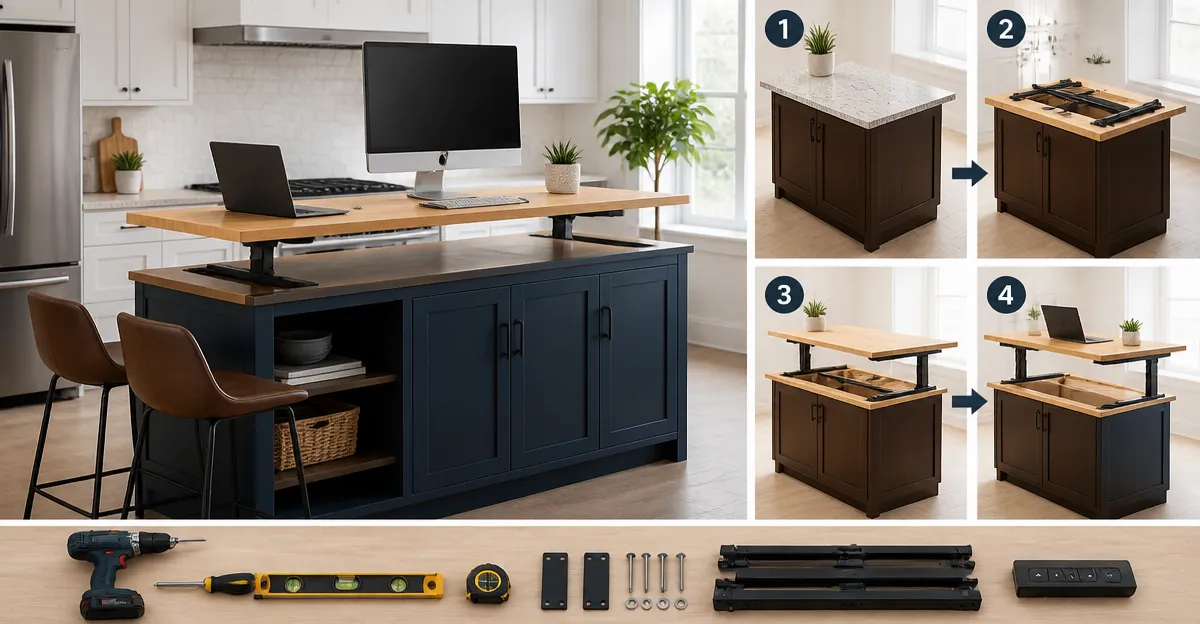
How to Convert a Kitchen Island into a Standing Desk: Easy DIY Guide for an Ergonomic Workstation
Introduction
One will discover a practical method for transforming a kitchen island into a functional standing desk that promotes health and productivity. The guide explains each phase of the conversion, from initial assessment to final adjustments, ensuring a safe and stable workstation. Readers will learn how to select appropriate tools, integrate ergonomic accessories, and maintain the aesthetic of the kitchen environment. This knowledge is valuable because it reduces sedentary time while preserving valuable floor space.
What You’ll Need
- Measuring tape and level
- Power drill with appropriate bits
- Wood screws or brackets suitable for the island material
- Non‑slip rubber pads
- Optional ergonomic surface: VIVO Black Standing Desk Converter
- Optional dual‑monitor platform: KYDEVO Standing Desk Converter
- Optional corner‑wide platform: VIVO Extra Wide Corner Desk Converter
- Optional wooden‑style platform: TechOrbits Standing Desk Converter
Step 1: Assess the Island Structure and Measure
The first task is to verify that the island can support the additional load of a standing workstation. One should measure the length, width, and height of the countertop, then compare these dimensions with the footprint of the chosen converter. Use a level to confirm that the surface is flat; any deviation greater than three millimetres may cause wobble. If the island is constructed from solid wood or sturdy laminate, it typically can bear the weight of most converters, which range from 22 to 44 pounds.
Step 2: Reinforce the Surface If Necessary
If the assessment reveals insufficient strength, reinforce the island by adding a plywood sub‑panel beneath the countertop. Secure the panel with wood screws, ensuring the screws are countersunk to avoid protrusion. Apply non‑slip rubber pads to the underside of the converter to distribute weight evenly and prevent movement. This reinforcement step is essential when using heavier models such as the KYDEVO Standing Desk Converter, which supports up to 44 pounds.
Step 3: Install the Standing Desk Converter
Place the chosen converter on the prepared island surface, aligning it with the edge to allow easy access to cabinets. For a single‑monitor setup, the VIVO Black Standing Desk Converter offers a 29‑inch work surface, a height range of 1.8 to 16.2 inches, and a load capacity of 22 pounds. Its zero‑assembly design saves time, and the simple‑touch height‑locking mechanism ensures smooth transitions. If a larger work area is required, the VIVO Extra Wide Corner Desk Converter provides a 38‑inch surface and a pneumatic lift that adjusts from 4.3 to 20 inches, supporting up to 33 pounds. Secure the converter with the supplied brackets if extra stability is desired.
Step 4: Add Ergonomic Accessories
Integrate a keyboard tray to maintain a neutral wrist position while typing. The KYDEVO Standing Desk Converter includes a detachable 29.5‑inch tray that moves in sync with the main platform, supporting a full‑size keyboard and mouse. For users who prefer a wooden aesthetic, the TechOrbits Standing Desk Converter offers a 32‑inch wide surface and a built‑in tray that can be attached with minimal tools. Position the monitor at eye level, approximately an arm’s length away, to reduce neck strain. Adjust the height using the converter’s mechanism until the top of the screen aligns with the user’s line of sight.
Step 5: Test Stability and Adjust Height
After installation, test the workstation by applying gradual pressure to the monitor, keyboard, and any additional accessories. Verify that the converter does not wobble and that the island remains level. Adjust the height in small increments, using the simple‑touch lock on the VIVO model or the gas‑spring lift on the KYDEVO model, until the user can comfortably alternate between sitting and standing. Record the preferred standing height for future reference, as this will streamline daily adjustments.
Tips & Pro Tips
- Place a cable management sleeve underneath the converter to keep power cords organized and prevent tripping hazards.
- Install a small LED strip along the underside of the island to provide adequate lighting when the workstation is raised.
- Consider adding a anti‑fatigue mat on the floor in front of the island to reduce foot pressure during prolonged standing.
- Schedule short movement breaks every 30 minutes to maximise the health benefits of a standing desk.
Troubleshooting
- Converter wobbles after adjustment: Re‑tighten the height‑locking mechanism and ensure the rubber pads are evenly placed.
- Insufficient clearance for monitors: Choose a converter with a larger surface, such as the VIVO Extra Wide Corner Desk Converter, or reposition the island against a wall.
- Weight limit exceeded: Verify the combined weight of all devices; if it exceeds the converter’s capacity, distribute load across two smaller converters.
Conclusion
One now possesses a complete, ergonomic standing workstation built directly onto a kitchen island, combining functionality with style. The guide has covered assessment, reinforcement, installation, accessory integration, and final testing, ensuring a safe and productive environment. By following these steps, users can reduce sedentary time, improve posture, and maintain a tidy kitchen layout. The transformation demonstrates how simple tools and thoughtful design can create a versatile workspace in any home.
Products Mentioned in This Guide
Frequently Asked Questions
What tools are needed to turn a kitchen island into a standing desk?
You’ll need a measuring tape, level, power drill with bits, wood screws or brackets, and non‑slip rubber pads.
How can I make sure the standing desk conversion is stable and safe?
Secure the island with brackets or screws anchored to the countertop, use a level to verify evenness, and add non‑slip pads to prevent movement.
Is it possible to add ergonomic accessories like monitor risers to a kitchen island desk?
Yes, you can place standing‑desk converters or dual‑monitor platforms on the island surface to create an ergonomic workstation.
Will converting the island affect the kitchen’s look or functionality?
When you use discreet brackets and keep the original countertop finish, the conversion blends with the kitchen and preserves usable workspace.
What ergonomic tips should I follow when using a kitchen island as a standing desk?
Keep the monitor at eye level, elbows at a 90‑degree angle, and use an anti‑fatigue mat to reduce strain while standing.