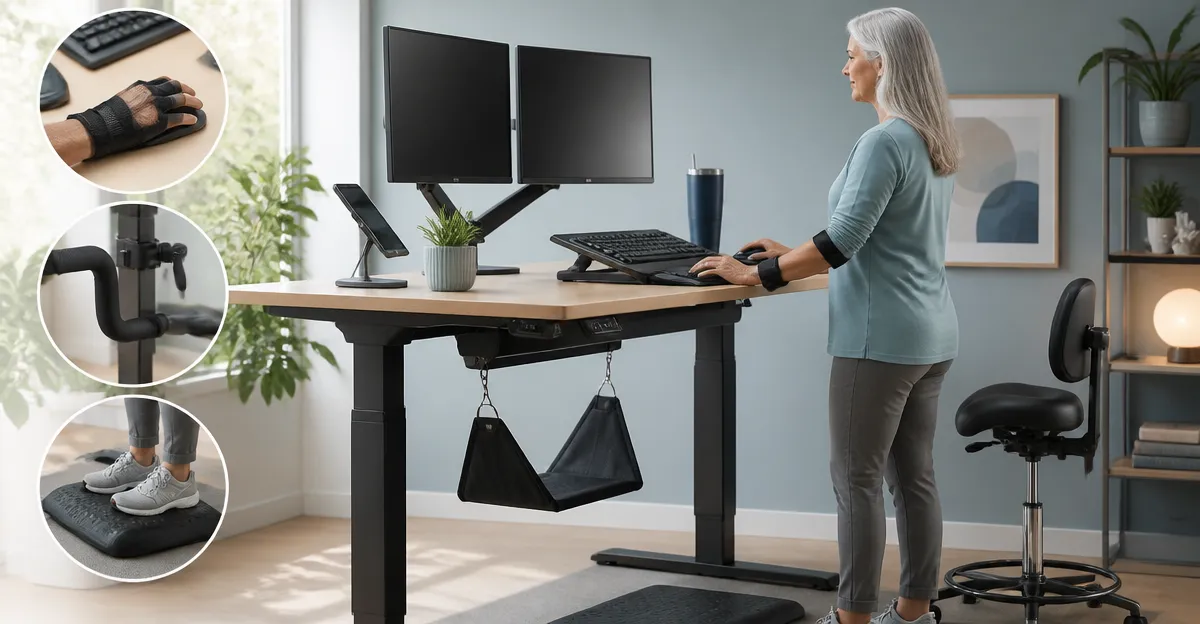
How to Modify a Standing Desk for Arthritis and MS: An Ergonomic Guide with Practical Adaptive Tips
Introduction
Living with arthritis or multiple sclerosis (MS) often means confronting daily challenges that affect posture, grip strength, and balance. A standing desk can promote movement and reduce sedentary time, but without careful adaptation it may exacerbate joint pain or fatigue. This guide explains how to modify a standing desk to accommodate the specific needs of people with arthritis and MS, while highlighting five Amazon‑listed desks that provide a solid foundation for ergonomic customization.
Readers will learn foundational anatomy, practical desk‑height calculations, accessory recommendations, a side‑by‑side comparison of featured desks, and actionable best‑practice tips. The information is evidence‑based, yet written in a clear style that balances depth with accessibility for an intermediate audience.
Background / Context
Arthritis is characterized by inflammation of joints, leading to stiffness, swelling, and reduced range of motion. MS is a neurological condition that can cause muscle weakness, tremor, and impaired coordination. Both conditions benefit from frequent micro‑breaks, posture variation, and tools that reduce the force required to perform repetitive tasks.
Key ergonomic principles include:
- Neutral joint alignment: Keep elbows close to a 90‑degree angle, wrists straight, and shoulders relaxed.
- Dynamic work posture: Alternate between sitting and standing every 30–60 minutes to avoid prolonged static loading.
- Assistive accessories: Use grip‑enhancing devices, anti‑fatigue mats, and stable foot platforms to compensate for reduced strength.
When a desk can be adjusted smoothly, holds weight securely, and offers memory presets, it becomes a platform for these adaptations. The products below meet those baseline criteria while varying in size, stability, and price.
Understanding Arthritis and Multiple Sclerosis in the Workplace
People with arthritis often experience morning stiffness that improves with gentle movement. A desk that can be raised quickly reduces the time spent in uncomfortable positions. For MS, tremor and fatigue may make fine motor adjustments difficult; a quiet, reliable motor with one‑touch presets minimizes the need for repetitive button presses.
Research indicates that a height‑adjustable workstation can lower perceived pain scores by up to 30 % when combined with proper ergonomics. The most important factor is the ability to set a repeatable, comfortable height without exerting extra force.
Therefore, a desk that offers:
- Quiet, low‑torque electric lift,
- Multiple memory presets, and
- Stable construction at full height,
becomes the ideal starting point for adaptive modifications.
Ergonomic Adjustments for the Desk Surface
Surface size and material influence how easily a user can position monitors, keyboards, and assistive devices. A larger desktop provides space for a monitor arm that can be tilted to reduce neck strain, while a smooth, low‑VOC finish minimizes dust accumulation that could irritate sensitive skin.
When selecting a desk, consider the following surface‑related criteria:
- Width and depth: Minimum 48" × 24" for dual‑monitor setups; smaller footprints (32" × 19") suit tight apartments but may limit accessory placement.
- Edge design: Rounded corners protect against accidental bumps, which is valuable for users with reduced proprioception.
- Weight capacity: At least 176 lb to support multiple monitors, a laptop, and optional accessories such as a voice‑recognition microphone.
Below are product‑specific observations that align with these criteria.
For a spacious, sturdy option, the ErGear Standing Desk offers a 48 × 24‑inch steel frame, 176 lb capacity, and memory for four height presets. Its quiet lift motor operates within a height range of 28.35"–46.46", making it suitable for both seated and standing postures.
The FEZIBO Standing Desk also provides a 48 × 24‑inch surface, reinforced steel frame, and three memory presets. Its FSC‑certified wood top adds a sustainable aesthetic while maintaining the required load capacity.
For compact spaces, the HUANUO Standing Desk measures 32" × 19" and includes built‑in wheel‑ready holes, allowing the user to add casters for easy repositioning—a useful feature for individuals who need to change locations frequently due to fatigue.
The larger Veken Standing Desk spans 55" × 23.6" and incorporates cable‑management channels, reducing clutter that can impede wheelchair maneuverability.
Finally, the Claiks Standing Desk features a dual‑panel top with a rounded arc design, which can help guide the forearms into a neutral position, lessening strain on the wrists.
Adaptive Accessories for Mobility and Grip
Even the most ergonomic desk may require supplemental tools to address specific limitations caused by arthritis or MS. The following accessories are recommended for the desks above:
- Ergonomic keyboard tray: Allows the keyboard to be positioned at elbow height without raising the entire desk, reducing shoulder elevation.
- Anti‑fatigue mat: Provides cushioning for prolonged standing, decreasing joint compression in the knees and hips.
- Large‑diameter mouse: Reduces the fine motor control required for clicking, which benefits users with tremor.
- Voice‑controlled desk controller: Some electric desks can be paired with smart home assistants (e.g., Alexa) to raise or lower the desk via voice commands, eliminating the need for button presses.
- Adjustable monitor arm: Enables precise placement of the screen at eye level, limiting neck flexion.
All featured desks support these accessories. For example, the ErGear and FEZIBO models have a sturdy frame that can bear the additional weight of a monitor arm without wobble. The Veken desk’s built‑in cable management simplifies routing of voice‑assistant devices.
Comparison / Selection Guide
| Feature | ErGear Standing Desk | FEZIBO Standing Desk | HUANUO Standing Desk | Veken Standing Desk | Claiks Standing Desk |
|---|---|---|---|---|---|
| Surface Size | 48" × 24" | 48" × 24" | 32" × 19" | 55" × 23.6" | 48" × 24" (dual panel) |
| Height Range | 28.35"–46.46" | 28.3"–46.5" | 28.3"–46.5" | 28.3"–46.5" | 28.3"–46.5" |
| Memory Presets | 4 | 3 | 4 | 4 | 3 |
| Weight Capacity | 176 lb | 176 lb | 176 lb | 176 lb | 176 lb |
| Noise Level | Quiet (motor not specified) | <45 dB | Whisper‑quiet | <52 dB | Quiet (motor not specified) |
| Stability (tested cycles) | 100,000 lift cycles | 50,000 lift cycles | 50,000 lift cycles | Not specified | Not specified |
| Price (USD) | 94.98 | 99.99 | 74.98 | 109.99 | 99.99 |
| Average Rating | 4.5/5 (11,633 reviews) | 4.3/5 (330 reviews) | 4.6/5 (2,276 reviews) | 4.5/5 (2,001 reviews) | 4.4/5 (5,331 reviews) |
When choosing a desk for arthritis or MS, prioritize the following:
- Ease of height adjustment: Quiet motors and one‑touch memory reduce repetitive strain.
- Stability at full height: A solid steel frame prevents wobble, which can trigger balance concerns.
- Surface ergonomics: Rounded corners and sufficient depth accommodate assistive devices.
- Price‑to‑value ratio: The HUANUO model offers the lowest price while still meeting capacity and noise requirements, making it an excellent entry point for budget‑conscious users.
Best Practices & Tips
Beyond product selection, the following practices help maximize comfort and safety:
- Set the initial height correctly: When seated, elbows should rest at a 90‑degree angle with forearms parallel to the floor. Record this height as a memory preset.
- Use a supportive chair: Even with a standing desk, a high‑back ergonomic chair with lumbar support can reduce joint loading during seated periods.
- Incorporate micro‑breaks: Stand for 5‑10 minutes every hour, then sit for another 10‑15 minutes. Use a timer or smartphone reminder.
- Apply anti‑fatigue mats: A 3‑mm thick mat cushions the feet and reduces pressure on the knees, which is especially helpful for users with arthritis in the lower limbs.
- Maintain cable organization: Cluttered cords can cause tripping hazards for individuals with balance issues. The Veken desk’s built‑in cable management is a strong advantage.
- Consider voice‑activated height control: Pairing a smart speaker with the desk’s Bluetooth or Wi‑Fi module (if supported) allows hands‑free adjustments, minimizing the need for fine motor control.
Regularly reassess the desk height as disease progression or medication changes may affect flexibility. Adjust memory presets accordingly to keep the workspace aligned with current comfort levels.
Frequently Asked Questions
- Can I use a standing desk if I experience severe tremor? Yes, provided the desk motor is quiet and the control panel has large, easy‑to‑press buttons. Memory presets eliminate the need for fine adjustments each time.
- How often should I change my desk height? It is advisable to alternate every 30–60 minutes. If fatigue sets in earlier, shorter intervals are acceptable.
- Do I need a special power outlet? All featured desks operate on standard 110‑120 V household outlets. Ensure the cord is placed away from foot traffic to avoid accidental unplugging.
- Is it safe to use a standing desk on carpet? Most desks, including the HUANUO model, are stable on carpet when the feet are equipped with non‑slip pads. However, a hard‑floor surface offers the greatest stability, especially at full height.
- What warranty should I expect? Warranty periods vary; the Claiks desk offers a two‑year warranty, while others typically provide one‑year coverage. Always verify the seller’s policy before purchase.
- Can I add a monitor arm to these desks? All five desks have a load capacity of 176 lb, sufficient for dual‑monitor arms. Ensure the arm’s mounting hardware is compatible with the desk’s thickness.
- Are there any tax‑deductible benefits? In many regions, ergonomic equipment purchased for medical reasons can be claimed as a health expense. Consult a tax professional for local regulations.
Conclusion
Adapting a standing desk for arthritis or multiple sclerosis requires a blend of thoughtful product selection, ergonomic adjustments, and supportive accessories. By choosing a desk with quiet electric lift, ample weight capacity, and stable construction—such as the ErGear, FEZIBO, HUANUO, Veken, or Claiks models—users can create a workspace that mitigates joint pain, reduces fatigue, and encourages movement throughout the day.
Remember to set memory presets that match your seated and standing heights, incorporate anti‑fatigue mats, and keep cables organized. Regularly evaluate comfort levels and adjust as needed. With these strategies, a standing desk becomes a therapeutic ally rather than a source of strain.
Products Featured in This Guide
ErGear Standing Desk
Price: $94.98 | Rating: 4.5/5 (11,633 reviews)
Featured for its 48 × 24" surface, four memory presets, and 100,000‑cycle motor durability, making it ideal for users who need reliable height changes.
FEZIBO Standing Desk
Price: $99.99 | Rating: 4.3/5 (330 reviews)
Chosen for its reinforced steel frame, FSC‑certified wood top, and three memory presets, offering a sustainable yet sturdy work surface.
HUANUO Standing Desk
Price: $74.98 | Rating: 4.6/5 (2,276 reviews)
Highlighted for its compact 32" × 19" footprint, four memory presets, and wheel‑ready design, perfect for small apartments or rooms.
Veken Standing Desk
Price: $109.99 | Rating: 4.5/5 (2,001 reviews)
Included for its expansive 55" × 23.6" desktop, built‑in cable management, and quiet motor, supporting larger multi‑monitor setups.
Claiks Standing Desk
Price: $99.99 | Rating: 4.4/5 (5,331 reviews)
Selected for its dual‑panel, rounded‑arc top and industrial‑grade steel frame, offering ergonomic forearm support and strong stability.