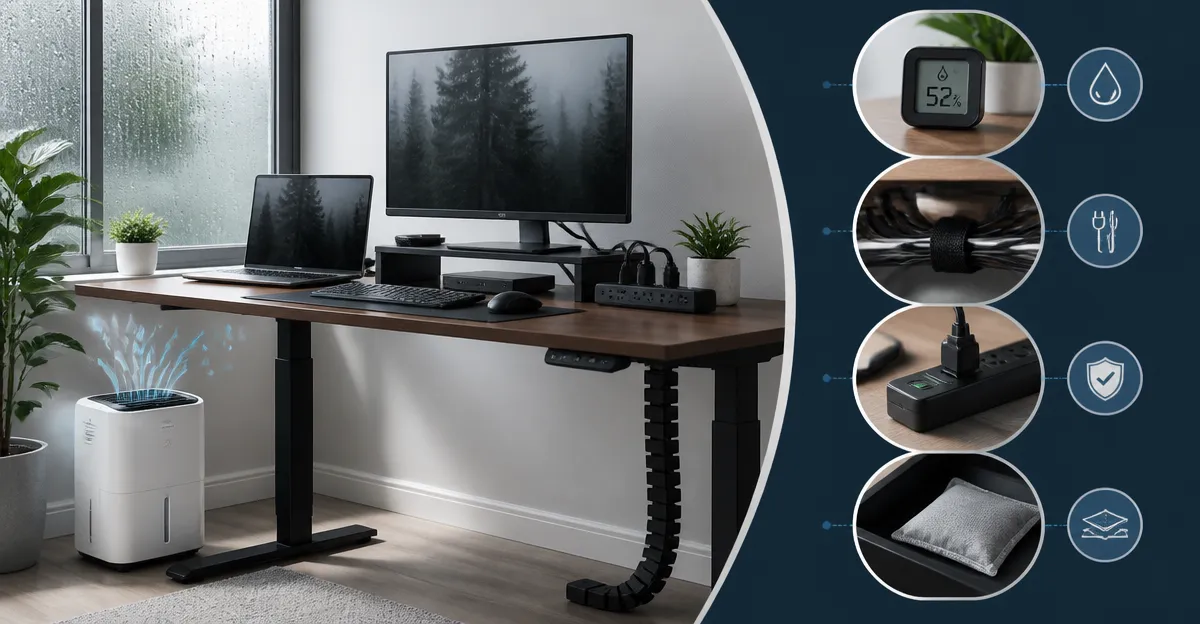
How to Protect Standing Desk Electronics from Humidity: Essential Tips to Prevent Moisture Damage
Introduction
In modern work environments, standing desks have become a popular solution for improving posture and increasing productivity. However, electronic components such as monitors, docking stations, and power strips are vulnerable to excess moisture, which can cause corrosion, short circuits, and premature failure. This guide explains how to assess indoor humidity, select appropriate moisture‑control tools, and implement protective strategies that extend the lifespan of standing‑desk electronics. By following the recommended steps, readers will gain confidence that their investment remains reliable even in humid climates.
The information presented is practical for homeowners, office managers, and remote workers who operate standing desks in apartments, houses, or shared workspaces. The guide combines scientific principles with real‑world product recommendations, ensuring that the reader can act immediately without unnecessary expense.
What You'll Need
- Portable dehumidifier suitable for the size of the room (recommended options are listed below).
- Silicone moisture‑absorbing pads or desiccant packets for localized protection.
- Cable management sleeves to prevent water ingress along power cords.
- Humidity monitor or hygrometer to track relative humidity levels.
- Basic cleaning supplies such as microfiber cloths and isopropyl alcohol.
Step‑by‑Step Instructions
Step 1: Measure the Indoor Humidity
The first action is to determine the current relative humidity (RH) within the workspace. A digital hygrometer placed on the desk surface will provide an accurate reading. Aim for an RH range between 45 % and 55 %; values above 60 % increase the risk of condensation on electronic housings.
If the measurement exceeds the target range, the next step is to introduce active moisture removal. This is where a portable dehumidifier becomes essential.
Step 2: Choose an Appropriate Dehumidifier
Select a dehumidifier that matches the square‑footage of the room and the expected moisture load. For typical home offices ranging from 200 sq ft to 300 sq ft, the following models provide reliable performance:
- TABYIK 35oz Dehumidifier – Priced at $25.19 with a 4.1‑star rating from 16,342 reviews. Its 35 oz transparent tank, ultra‑quiet 28 dB operation, and auto shut‑off feature make it ideal for bedrooms, closets, and small office spaces.
- SANVINDER 25oz Dehumidifier – Priced at $31.69 with a 4.2‑star rating from 3,805 reviews. The unit consumes only 0.96 kW per day, offers a 7‑color mood light, and includes an auto‑off function for safety.
- Windangel 44oz Dehumidifier – Priced at $36.07 with a 4.1‑star rating from 462 reviews. It provides three dehumidification modes, a 10‑color light system, and a timer that can run up to 72 hours.
- ToLife 95oz Dehumidifier – Priced at $59.96 with a 4.2‑star rating from 6,987 reviews. This larger unit covers up to 1,000 sq ft, includes a sleep mode below 30 dB, and features a sizable 95 oz tank.
- Eva‑Dry Wireless Mini Dehumidifier – Priced at $14.97 with a 4.2‑star rating from 35,292 reviews. It uses rechargeable silica gel, requires no power cord, and is perfect for confined spaces such as drawers or cabinet interiors.
For a standing‑desk environment, the TABYIK 35oz Dehumidifier offers the best balance of capacity, noise level, and price. Its compact footprint (5.9 × 5.9 × 10.1 in) allows placement directly beneath the desk, while the built‑in handle facilitates relocation when the workspace is rearranged.
Step 3: Position the Dehumidifier Effectively
Place the dehumidifier at least twelve inches away from the desk surface to ensure unrestricted airflow. The intake should face the general direction of the room, and the exhaust should be unobstructed. If the room has a window, position the unit opposite the window to counteract incoming moisture.
For larger spaces, the ToLife 95oz Dehumidifier can be positioned near the center of the room, allowing its higher capacity to maintain consistent humidity throughout the area.
Activate the appropriate mode based on the time of day: use the “Sleep” or “Quiet” setting during evening work sessions to prevent audible distraction, and switch to “Performance” mode during daytime when humidity spikes.
Step 4: Install Localized Moisture Barriers
Even with a dehumidifier operating, moisture can accumulate on the desk surface itself, especially if the floor is concrete or the room lacks proper ventilation. Apply silicone moisture‑absorbing pads beneath the keyboard tray and around power outlets. Desiccant packets can be placed inside cable management sleeves to protect cords from condensation.
For added protection, consider a waterproof desk mat made of silicone or rubber. This barrier prevents water droplets from reaching the base of monitors and docking stations.
Step 5: Maintain the Dehumidifier and Workspace
Regular maintenance ensures continuous performance. Empty the water tank before it reaches the auto‑shut‑off threshold (approximately 700 ml for the TABYIK model). Clean the filter according to the manufacturer’s instructions, typically once every month.
Inspect the hygrometer weekly and adjust the dehumidifier settings if the RH climbs above 55 %. Replace silica‑gel beads in the Eva‑Dry Wireless Mini Dehumidifier after 20‑30 days of use by recharging the unit according to the included charger specifications.
Finally, keep the desk area free of clutter that could obstruct airflow. Dust accumulation on vents reduces efficiency and may cause the unit to overheat.
Tips & Pro Tips
- Use a digital hygrometer with a calibrated sensor for the most accurate readings.
- When the room experiences seasonal humidity spikes, increase the dehumidifier runtime by using the timer function on the Windangel 44oz Dehumidifier (24‑hour or 48‑hour cycles).
- Combine a larger dehumidifier with a small Eva‑Dry Wireless Mini Dehumidifier inside closed cabinets to protect stored electronics such as external hard drives.
- Schedule a weekly inspection of all moisture‑absorbing pads; replace them when they feel damp to the touch.
- If the workspace is located in a basement, consider a dehumidifier with a built‑in defrost feature (available on the Windangel model) to prevent ice buildup during colder months.
Troubleshooting
| Problem | Possible Cause | Solution |
|---|---|---|
| Dehumidifier does not turn on | Power cord not fully inserted or auto‑shut‑off engaged due to full tank. | Verify that the unit is plugged into a functioning outlet, empty the tank, and reset the device according to the user manual. |
| Humidity remains high despite operation | Room size exceeds unit capacity or airflow is blocked. | Upgrade to a higher‑capacity model such as the ToLife 95oz Dehumidifier, and ensure vents are clear of furniture. |
| Excessive noise | Unit placed on uneven surface or filter clogged. | Place the dehumidifier on a flat, stable surface and clean the filter. |
Conclusion
Protecting standing‑desk electronics from humidity requires a systematic approach that begins with accurate measurement, continues with the selection of an appropriate dehumidifier, and concludes with regular maintenance and localized barriers. By implementing the steps outlined above, readers can minimize the risk of moisture‑induced failure, preserve the performance of valuable devices, and maintain a comfortable working environment. The recommended products provide reliable, energy‑efficient solutions that integrate seamlessly into any office layout.
Products Mentioned in This Guide
Frequently Asked Questions
Why does humidity damage standing‑desk electronics?
High moisture can cause corrosion, short circuits, and component failure in monitors, docking stations, and power strips.
How can I measure indoor humidity around my standing desk?
Use a digital hygrometer; keep it at desk height and check readings regularly.
What type of dehumidifier is best for a home office with a standing desk?
A portable, energy‑efficient unit sized for the room’s square footage, with automatic humidity control, works well.
Can I protect electronics without buying a dehumidifier?
Yes, use silica‑gel packs, moisture‑absorbing mats, and keep cables off damp floors.
How often should I inspect standing‑desk equipment for moisture damage?
Check for condensation, rust, or discoloration at least once a month, especially during humid seasons.