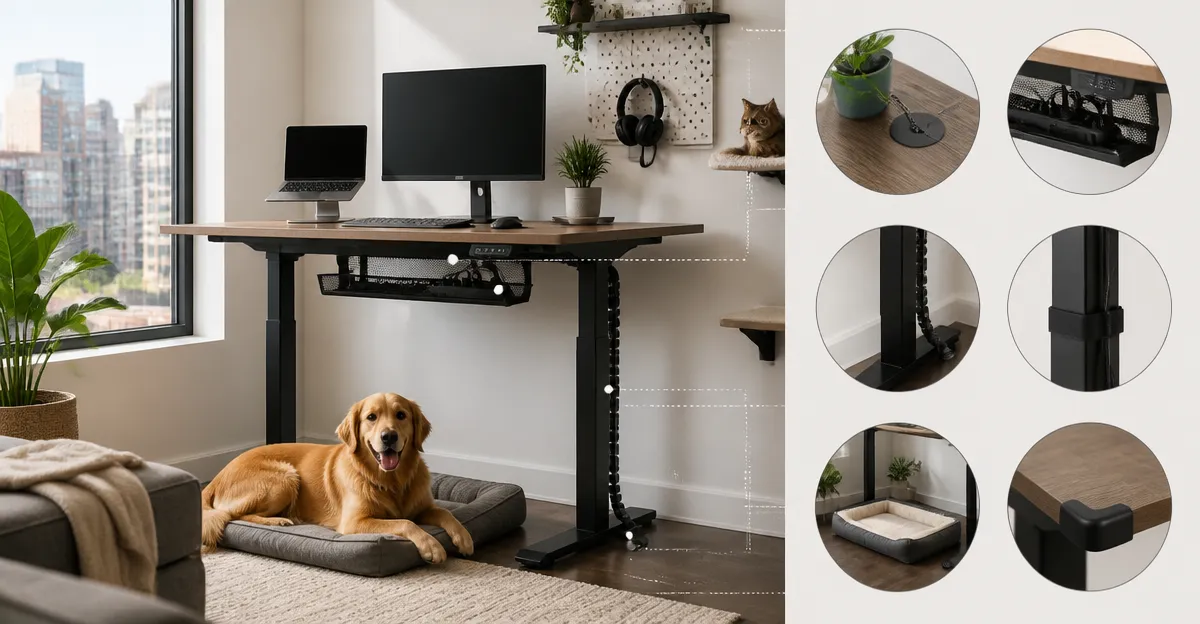
How to Pet‑Proof Your Standing Desk Setup in a Small Apartment: Space‑Saving, Cable‑Management & Safety Tips
Living in a compact apartment often means sharing limited floor space with a beloved pet. This guide teaches readers how to create a functional standing‑desk workstation that is safe for cats or dogs, organized, and efficient. By following the steps, one will reduce hazards, keep cables out of reach, and preserve valuable square footage without sacrificing ergonomics. The information is valuable for anyone who works from home, studies, or enjoys gaming while caring for a pet.
What You'll Need
- Adjustable standing desk (choose one that fits your space and budget)
- Cable‑management accessories such as clips, sleeves, or a desk‑mounted organizer
- Non‑slip floor mat or rug to deter pet climbing
- Storage solutions – drawers, shelves, or small bins
- Basic tools – screwdriver, Allen wrench (often included with the desk)
Step 1: Select a Desk That Matches Your Apartment Layout
The first decision determines how much floor area remains for pet movement. For a modest studio, the HUANUO Small Electric Standing Desk offers a 32" x 19" footprint that slides neatly into a corner while still providing a comfortable work surface. Its compact size, rounded safety corners, and 176 lb load capacity make it ideal for a laptop, monitor, and a few accessories without overwhelming the room.
If the apartment includes a larger dedicated work zone, the ErGear 48" Electric Standing Desk supplies a spacious 48" x 24" top for dual monitors, a keyboard tray, and extra room for pet toys that can be stored underneath. Its powerful motor with four memory presets and a steel frame rated for 176 lb ensures stability even when a pet jumps nearby.
Both desks feature quiet lift mechanisms, which prevent startling pets during height adjustments. The choice depends on whether the priority is maximum surface area (ErGear) or ultra‑compact placement (HUANUO).
Step 2: Secure All Cables to Prevent Chewing and Tripping
Pets love to explore cords, which can lead to electrical hazards. Begin by routing power and data cables through the built‑in cable‑management hub of the Veken Standing Desk with Drawers. This desk includes a dedicated tray and hook that keep cords organized and out of reach, reducing the temptation for a curious cat to bat at them.
If the chosen desk lacks an integrated hub, purchase zip‑tie sleeves or adhesive cable clips (not listed above but inexpensive) and bundle cables along the underside of the desktop. Position the bundles close to the wall where the pet cannot easily access them.
After routing, test each cable for firmness; a loose cord should be secured with an additional clip. Finally, use a low‑profile floor cord cover to hide any remaining wires that run across the floor.
Step 3: Ensure Desk Stability to Avoid Tipping Accidents
Even the sturdiest desk can wobble if placed on uneven flooring or if a pet leans against it. The Claiks 48" Electric Standing Desk employs an industrial‑grade steel frame and reinforced crossbars, providing excellent stability for both sitting and standing positions. Its three memory presets allow quick height changes without the need to readjust the base each time.
For added safety, adjust the desk's leveling feet (included with most models) until the surface is perfectly horizontal. If the apartment has carpet, place a non‑slip mat beneath the desk legs; this prevents sliding and gives the pet a stable surface to walk on.
When the desk is fully extended, verify that the load does not exceed the 176 lb capacity. Overloading can cause the motor to strain, leading to unexpected movements that might frighten a pet.
Step 4: Add Pet‑Friendly Storage and Barriers
Designate a drawer or bin for pet toys, treats, and grooming tools. The Veken Standing Desk with Drawers includes a built‑in drawer that keeps small items off the floor, reducing clutter that could become a tripping hazard.
Consider placing a decorative screen or a low bookshelf behind the desk to create a visual barrier. This discourages a cat from jumping onto the monitor while still allowing the pet to observe its owner.
Keep the pet's water bowl on a separate stand away from the desk to avoid spills that could damage electronics.
Step 5: Optimize the Workspace for Small‑Apartment Living
Utilize vertical space by adding wall‑mounted shelves for books or reference material, freeing up desk surface for essential work items. A monitor arm (compatible with any of the desks listed) can lift the screen off the desktop, creating more room for a keyboard, mouse, and a pet‑safe mat.
The Cubiker 48" Electric Standing Desk offers a spacious top and a sleek white frame that blends with many décor styles. Its quiet motor (under 45 dB) and three memory presets make it a discreet choice for shared living spaces where noise could disturb a sleeping pet.
Arrange the desk so that the pet's favorite perch (a cushion or cat tree) is positioned away from the main work area, encouraging the animal to settle elsewhere while you focus.
Step 6: Conduct Regular Safety Checks
- Inspect cable ties and clips weekly for wear.
- Test the desk's stability after any adjustment.
- Verify that the motor operates smoothly without unusual noises that could indicate a loose component.
- Clean the desktop regularly to remove pet hair that can accumulate around the motor vent.
By maintaining a routine, one prevents minor issues from becoming major hazards, ensuring a safe environment for both the user and the pet.
Tips & Pro Tips
- Use a pet‑deterrent spray on the underside of the desk legs if the animal tends to climb.
- Place a textured floor mat in front of the desk; many pets dislike the feel and will stay back.
- Employ a wireless keyboard to reduce the number of cords on the surface.
- Schedule short standing intervals to give the pet a chance to receive attention, reinforcing positive behavior.
Troubleshooting
Problem: The desk motor makes a grinding noise after several adjustments.
Solution: Power down the desk, inspect the lifting columns for debris, and tighten any loose bolts using the supplied Allen wrench. If the noise persists, contact the manufacturer's support – most desks listed provide a warranty of at least two years.
Problem: Cables continue to be chewed despite management.
Solution: Apply a pet‑safe bitter spray to the exposed portions of the cord. Additionally, route the cables through a PVC conduit that is difficult for pets to bite through.
Conclusion
Pet‑proofing a standing‑desk setup in a small apartment combines ergonomic design with animal safety. By selecting an appropriately sized desk, securing cables, stabilizing the base, and adding pet‑friendly storage, one creates a harmonious workspace that respects limited square footage. Implement the routine checks and pro tips outlined above, and the reader will enjoy a productive environment while keeping their furry companion safe and happy.
Products Mentioned in This Guide
Frequently Asked Questions
How can I choose a standing desk that fits a small apartment while leaving room for my pet?
Select a compact, adjustable desk with a narrow footprint or wall‑mount option, and measure the remaining floor space to ensure your pet can move freely.
What are the best cable‑management methods to keep pets safe?
Use desk‑mounted clips, cable sleeves, or a zip‑tie organizer to bundle cords out of reach, and secure any excess wire behind the desk or under a rug.
How can I prevent my cat or dog from climbing onto my standing desk?
Place a non‑slip floor mat or low‑profile rug underneath and add a small deterrent like a double‑sided tape strip on the desk surface.
What storage solutions help keep a pet‑proof workspace tidy?
Incorporate shallow drawers, wall‑mounted shelves, or labeled bins to hide accessories and keep clutter away from curious paws.
Do I need any special tools to set up a pet‑proof standing desk?
Usually a screwdriver or Allen wrench (often included) is enough; no additional tools are required for basic assembly and cable organization.