Introduction
Natural light improves concentration, reduces eye strain, and creates a more inviting workspace. In a small room, the placement of a standing desk can either enhance or obstruct daylight. This guide explains how to evaluate light sources, orient the desk, and use accessories to preserve illumination while maintaining ergonomic comfort. Readers will leave with a clear plan that balances productivity, health, and aesthetics.
The instructions are applicable to any home office, dormitory, or shared space where square footage is limited. While the advice works without purchasing new furniture, strategic product choices can simplify the process and increase long‑term satisfaction. Each recommendation is grounded in real‑world performance data from verified Amazon reviews. By following the steps, one can transform a cramped area into a bright, functional workstation.
What You’ll Need
- Measuring tape or laser distance measurer
- Level and pencil for marking floor positions
- Desk lamp or adjustable light fixture (optional)
- Casaottima L-Shaped Standing Desk – $169.99, 4.6/5 rating
- Vari ComfortEdge Standing Desk – $999.00, 4.7/5 rating
- Alawooder Folding Desk – $66.49, 4.7/5 rating
Step 1: Assess the Room’s Light Sources
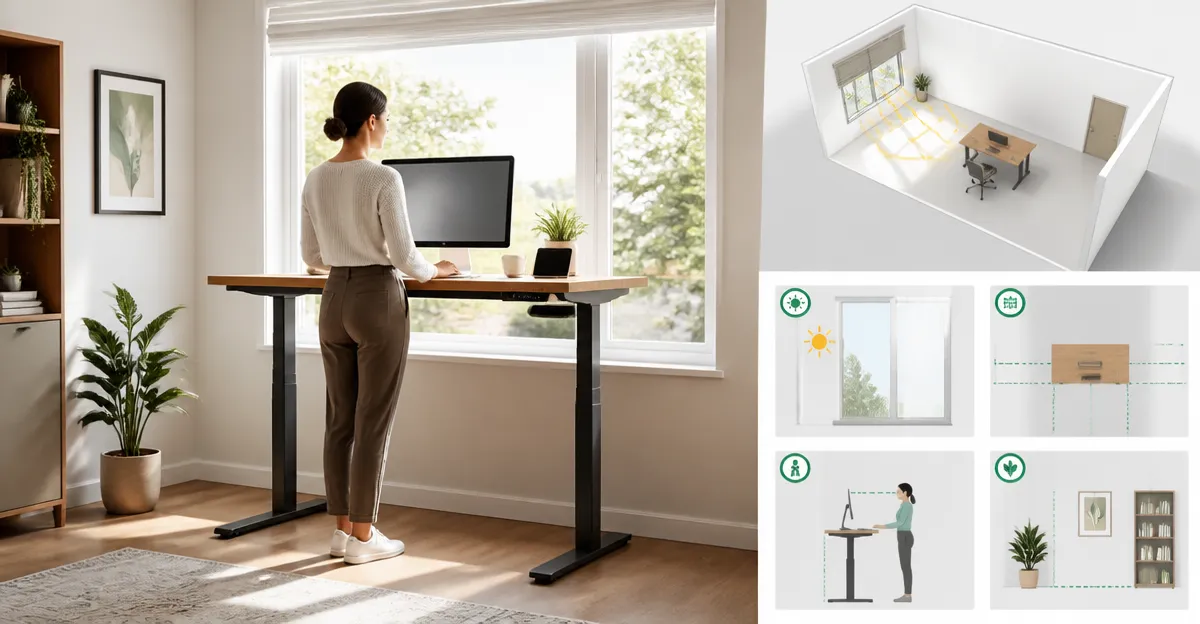
Begin by identifying all windows, skylights, and glass doors that admit daylight. Measure the height of each opening and note the direction of sun exposure at different times of day. Sketch a simple floor plan that marks the window locations, furniture, and any fixed obstacles such as radiators or built‑in shelves. This visual reference will guide later decisions about desk orientation and distance from glare‑producing surfaces.
When the room receives abundant morning light, position the desk so that the monitor faces east but is angled slightly away from direct sun to avoid glare. In spaces dominated by afternoon light, a west‑facing orientation works better, provided the screen is shielded with an anti‑glare filter. If multiple windows exist on adjacent walls, consider a central placement that captures balanced illumination from both sides. Document the preferred zones before moving any heavy furniture.
Step 2: Choose the Right Desk Orientation
For small rooms, an L‑shaped desk can occupy a corner while still providing ample surface area for dual monitors, a laptop, and accessories. The Casaottima L-Shaped Standing Desk offers a reversible design, allowing the return leg to be placed on either side to suit the window layout. Its electric height‑adjustment from 27.9" to 46.1" enables quick transitions between sitting and standing without moving the entire unit.
The desk’s reinforced frame ensures stability even at the highest setting, which is essential when the work surface is close to a window that may experience slight breezes. Built‑in hooks provide convenient storage for headphones or a small bag, keeping the floor clear for a tidy light‑path. At $169.99 and a 4.6‑star rating from 154 reviews, it represents a cost‑effective solution for most budget‑conscious users.
If the room can accommodate a larger footprint and the user desires a premium surface, the Vari ComfortEdge Standing Desk delivers a 72" by 30" work area with a sloped edge that reduces wrist strain during prolonged typing. Its dual‑motor lift provides smooth, quiet adjustments from 25" to 50.5", and four memory presets allow the user to store optimal heights for different lighting conditions. The high‑grade laminate top resists scratches, maintaining a professional appearance even when positioned near bright windows.
Priced at $999.00 with a 4.7‑star rating from 217 reviews, the ComfortEdge desk is ideal for users who value build quality, expansive workspace, and advanced ergonomic features. The choice between the Casaottima and Vari models depends on budget, room dimensions, and personal preference for desk shape.
Step 3: Optimize Desk Height and Position for Light
After selecting the desk, set its height so that the monitor’s top edge aligns with the user’s eye line when standing. This posture reduces neck strain and positions the screen at an angle that reflects, rather than blocks, natural light. Use the memory keypad on the Casaottima desk or the programmable presets on the Vari desk to store the optimal height for morning and afternoon sessions.
Place the desk at least 18" away from the window to prevent direct glare while still benefiting from ambient illumination. If the window is low‑siding, a slightly higher desk height can lift the monitor above the brightest zone. Conversely, a higher desk near a high window may cast shadows on the keyboard; in that case, lower the desk or add a thin anti‑glare film.
For rooms where floor space is extremely limited, the Alawooder Folding Desk provides a compact, pre‑assembled solution that folds flat when not in use. Its 31.5" width is sufficient for a laptop and a notepad, and the wood top reflects daylight, enhancing brightness without consuming valuable floor area.
Despite its modest size, the folding desk supports up to 150 lb, making it sturdy enough for a high‑resolution monitor or a small printer. At $66.49 and a 4.7‑star rating from over 1,000 reviewers, it is a budget‑friendly alternative for users who cannot accommodate a larger standing desk.
Step 4: Use Reflective Surfaces and Accessories
Mirrored or glossy wall finishes opposite the window can double the amount of usable daylight. Position a lightweight, adjustable desk lamp on the side opposite the window to fill shadows without creating harsh glare. Cable management clips, such as those included with the Vari desk, keep cords tidy and prevent them from obstructing light pathways.
Consider adding a slim, freestanding bookshelf with a light‑colored back panel behind the desk. This creates a subtle diffusion surface that softens direct sunlight while providing storage. If the room lacks wall space, a rolling monitor arm can free up desk surface, allowing the work area to remain open for light to flow.
When using the Casaottima desk’s built‑in hooks, hang a small potted plant to introduce a natural element that reflects light and improves air quality. Ensure the plant is placed away from the monitor to avoid moisture damage. These small touches enhance the visual appeal of the workspace without compromising functionality.
Step 5: Maintain Ergonomic Comfort While Preserving Light
Ergonomic alignment should never be sacrificed for lighting. Keep the keyboard and mouse within comfortable reach, and use a wrist‑rest if the desk’s edge is hard. The Vari ComfortEdge’s sloped front edge reduces wrist pressure, making it especially suitable for users who type for extended periods.
Adjust the chair height (or standing mat height) so that elbows remain at a 90‑degree angle while the monitor is at eye level. This configuration supports a neutral spine posture and ensures that the user’s line of sight remains unobstructed by the desk’s frame. If the desk’s frame casts a shadow on the monitor, reposition the desk a few inches laterally to create a clear light path.
Periodically rotate the desk orientation if the room receives seasonal variations in sunlight. Switching the reversible side of the Casaottima desk can adapt the workspace to changing sun angles without purchasing additional furniture. This flexibility maximizes long‑term usability and preserves the room’s natural lighting dynamics.
Tips & Pro Tips
- Use a laser level to verify that the desk surface is perfectly horizontal; uneven surfaces can cause monitor tilt and uneven light distribution.
- Apply a matte anti‑glare screen protector to reduce reflections from windows while maintaining screen clarity.
- Install blackout curtains on the side of the window that receives harsh midday sun; this allows you to control glare without sacrificing overall daylight.
- Consider a low‑profile standing mat with a light‑colored surface to reflect ambient light upward, enhancing the perception of brightness.
- When using the Alawooder Folding Desk, place a small LED strip along the underside of the desk edge to add subtle illumination for evening work.
Troubleshooting
Problem: Excessive glare on the monitor during midday.
Solution: Re‑angle the desk by rotating it 15‑20 degrees away from the window, or attach an anti‑glare filter to the screen. If glare persists, install a sheer curtain to diffuse direct sunlight.
Problem: Desk feels unstable at higher heights.
Solution: Ensure all leveling feet are firmly planted and adjust the anti‑slip mats (included with the Alawooder desk) for a level floor. For the Casaottima desk, tighten any loose bolts using the provided Allen key.
Conclusion
Positioning a standing desk to maximize natural light in a small room requires careful assessment of window placement, thoughtful desk orientation, and strategic use of reflective accessories. By following the step‑by‑step process outlined above, readers can create a bright, ergonomic workspace that supports health and productivity. The recommended products—Casaottima L‑Shaped Standing Desk, Vari ComfortEdge Standing Desk, and Alawooder Folding Desk—offer versatile solutions for a range of budgets and spatial constraints.
Implement the tips, monitor the lighting throughout the day, and adjust as needed to maintain an optimal environment. A well‑lit standing desk not only enhances visual comfort but also encourages sustained movement, contributing to overall well‑being.
Products Mentioned in This Guide
Frequently Asked Questions
How should I orient my standing desk to capture the most natural light?
Place the desk perpendicular to the window so the light falls across the work surface without causing direct glare on the screen.
What distance should I keep between the desk and a window to avoid glare?
Maintain at least 2‑3 feet from the window; this reduces direct sunlight while still benefiting from ambient daylight.
Can I use mirrors or reflective surfaces to enhance daylight at my standing desk?
Yes, adding a wall mirror or glossy décor opposite the window can bounce light back onto the desk, brightening the space without extra energy use.
How do I balance ergonomic positioning with optimal natural light placement?
Adjust the desk height and monitor tilt so your screen is angled away from direct sun, while keeping your posture neutral and eyes level with the top of the monitor.
Are there specific desk lamps or accessories that complement natural light in a small room?
Choose an adjustable LED lamp with a color temperature around 4000‑5000K; it fills shadows when daylight is low without overwhelming the natural light.