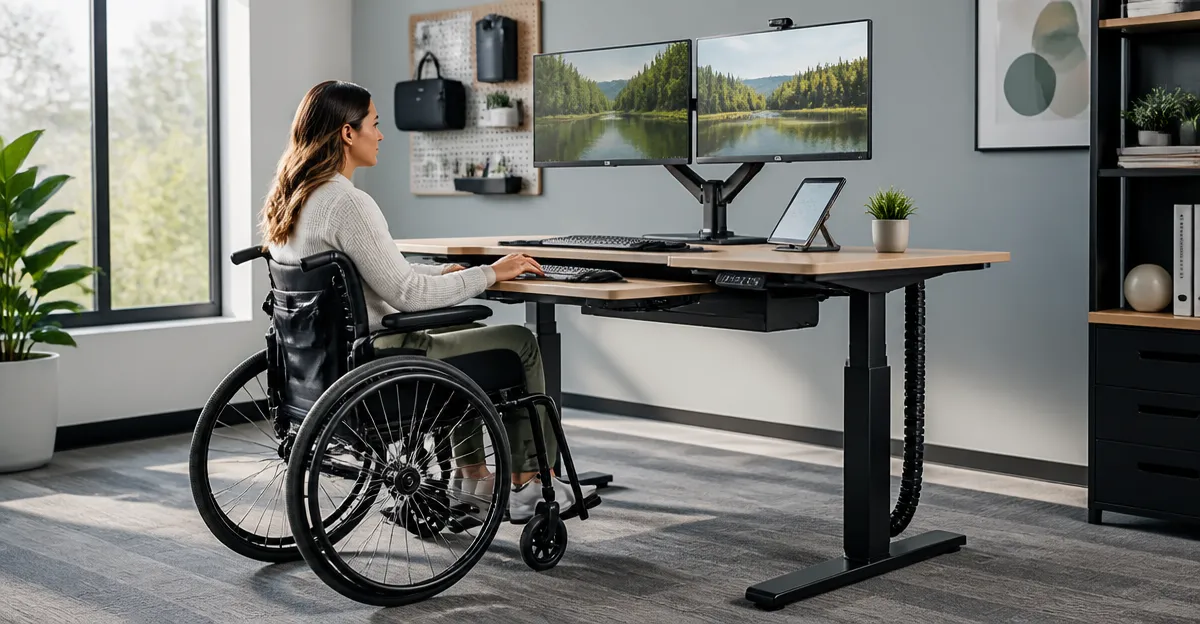
Adaptive Standing Desk Modifications for Wheelchair Users: The Complete Guide to Accessible, Ergonomic, and Safe Solutions
Introduction
One will find that the modern workplace increasingly values flexibility, health, and inclusivity. This guide explores how standing desks can be adapted for wheelchair users, providing a pathway to healthier work habits without sacrificing accessibility. Readers will learn foundational concepts, practical modification strategies, and product recommendations that align with safety standards. By the end of this guide, one will be equipped to evaluate options, implement best‑practice adjustments, and answer common questions about adaptive standing workstations.
Background and Context
Ergonomic research demonstrates that alternating between sitting and standing reduces musculoskeletal strain and improves circulation. However, traditional sit‑stand desks often assume a standing user with unobstructed floor space, which is not the case for many wheelchair users. Accessibility guidelines, such as the Americans with Disabilities Act (ADA), require that work surfaces be reachable, stable, and adjustable without excessive force. Understanding these principles is essential before selecting or modifying a desk. Key terms include "reach envelope" (the area a user can comfortably access) and "clear floor space" (the unobstructed area needed for wheelchair maneuverability).
Assessing the Workspace
Before any modification, one should conduct a thorough workspace audit. Measure the wheelchair’s width, turning radius, and the distance from the seat to the desk surface. Verify that the floor can support the weight of both the wheelchair and any added equipment. Ensure that the lighting, power outlets, and cable management solutions are positioned to avoid tripping hazards. This assessment creates a baseline that informs the selection of adjustable components and informs the placement of lockable wheels for stability.
Key Modification Strategies
Three primary strategies enable a standing desk to become wheelchair‑friendly: height adaptability, mobile stability, and ergonomic accessories. Height adaptability allows the desk surface to align with the wheelchair user’s elbow height, typically ranging from 24 to 36 inches for most users. Mobile stability is achieved through lockable casters that prevent unwanted movement while permitting repositioning when needed. Ergonomic accessories, such as monitor arms and keyboard trays, extend the reach envelope without requiring the user to overextend.
Product Recommendation: HUANUO Mobile Sit‑Stand Rolling Laptop Desk
The HUANUO Mobile Sit‑Stand Rolling Laptop Desk exemplifies a compact, height‑adjustable workstation that can be integrated into a wheelchair‑accessible environment. Its height range of 28.5" to 46.1" accommodates a broad spectrum of elbow heights, while the robust cold‑rolled steel frame supports up to 10 kg (22 lb). The four lockable casters allow the desk to be moved effortlessly and secured in place, providing the stability required for safe operation. The scratch‑resistant laminate desktop measures 25.6" × 15.7", fitting comfortably beside most wheelchair models without encroaching on the clear floor space.
Additional specifications include a weight capacity of 10 kg, a rating of 4.7 out of 5 stars based on 135 reviews, and a price of $44.98. The product is currently in stock, and HUANUO offers responsive customer service for assembly assistance. These attributes make the desk a valuable component of an adaptive workstation.
Integrating the Desk with Wheelchair Users
To adapt the HUANUO desk for wheelchair use, one should first position the desk so that the surface aligns with the user’s forearm when seated. The height can be adjusted in small increments using the built‑in lever, ensuring a precise fit. Once the optimal height is set, engage the wheel locks to prevent movement during typing or writing. For users who require a monitor at eye level, a detachable monitor arm can be attached to the desktop, extending the screen upward without increasing the desk’s footprint.
Cable management is essential to maintain a safe environment. The desk’s underside can accommodate zip ties or a cable tray, keeping power cords away from the wheels. If additional stability is needed, a floor‑mounted bracket can be installed behind the desk to anchor it to the ground, though this is optional for most users.
Comparison and Selection Guide
| Feature | HUANUO Mobile Sit‑Stand Rolling Laptop Desk | Typical Fixed Standing Desk | Considerations for Wheelchair Users |
|---|---|---|---|
| Height Range | 28.5" – 46.1" | 30" – 50" (often manual) | HUANUO provides finer adjustment suitable for seated elbow height. |
| Mobility | Four lockable casters | Stationary base | Casters enable repositioning around the wheelchair and lock for stability. |
| Weight Capacity | 10 kg (22 lb) | 30 kg (66 lb) or more | HUANUO supports typical laptop and accessories; heavier monitors may require additional support. |
| Surface Area | 25.6" × 15.7" | Varies, often larger | Compact size preserves clear floor space for wheelchair maneuverability. |
| Price | $44.98 | $200 – $600 | Budget‑friendly option for users seeking basic adaptability. |
When selecting a desk, one should prioritize height adjustability, mobility, and footprint over raw weight capacity. The HUANUO desk satisfies these criteria while remaining affordable, making it an optimal choice for many wheelchair users.
Best Practices & Tips
- Measure the user’s elbow height while seated and set the desk surface within 2–3 inches of that measurement.
- Engage all four wheel locks after positioning the desk to prevent accidental movement.
- Use a monitor arm that clamps to the desktop to keep the screen at eye level without increasing desk depth.
- Employ cable organizers to route power and data cords away from the wheels and floor.
- Periodically check the stability of the desk and re‑tighten any loose bolts, especially after frequent relocation.
In addition to these tips, one should schedule regular breaks to alternate between sitting, standing, and gentle stretching. This practice reduces fatigue and promotes circulation, complementing the ergonomic benefits of the adaptive desk.
Frequently Asked Questions
- Can the HUANUO desk support a full‑size monitor? The desk’s 10 kg capacity comfortably holds most 15‑inch laptops and smaller monitors. For larger monitors, an external monitor arm that transfers weight to the desk frame is recommended.
- Is the height adjustment mechanism easy to operate with limited hand strength? The adjustment lever requires modest force and can be operated with a single hand, making it suitable for users with reduced grip strength.
- Will the casters damage hardwood floors? The casters are designed with soft‑rubber treads that minimize floor scratches. Using a protective rug underneath adds an extra layer of safety.
- How does one ensure the desk remains stable while typing? Engaging all four wheel locks creates a rigid base. For additional confidence, a floor‑mounted anchor can be installed, though it is not required for most users.
- Is assembly complex? The desk includes all necessary tools and a step‑by‑step guide. Most users complete assembly within 15 minutes.
- Can the desk be used in a bedside setting? Its compact dimensions and mobile design allow placement beside a bed, enabling work or leisure activities from a seated position.
- What warranty does HUANUO provide? The manufacturer offers a one‑year limited warranty covering defects in materials and workmanship.
Conclusion
One now understands how to transform a conventional sit‑stand desk into an accessible workstation for wheelchair users. By focusing on height adaptability, mobile stability, and ergonomic accessories, a safe and productive environment can be created without excessive expense. The HUANUO Mobile Sit‑Stand Rolling Laptop Desk demonstrates that thoughtful design and affordable pricing can coexist, offering a practical solution for many users. Implementing the best‑practice tips and following the selection guide will ensure long‑term comfort and efficiency.
Products Featured in This Guide
HUANUO Mobile Sit‑Stand Rolling Laptop Desk
Price: $44.98
Rating: 4.7 out of 5 stars (135 reviews)
Why it is featured: It offers a compact footprint, lockable casters, and a wide height range, making it an ideal adaptable solution for wheelchair users seeking an affordable yet functional standing desk.