Introduction
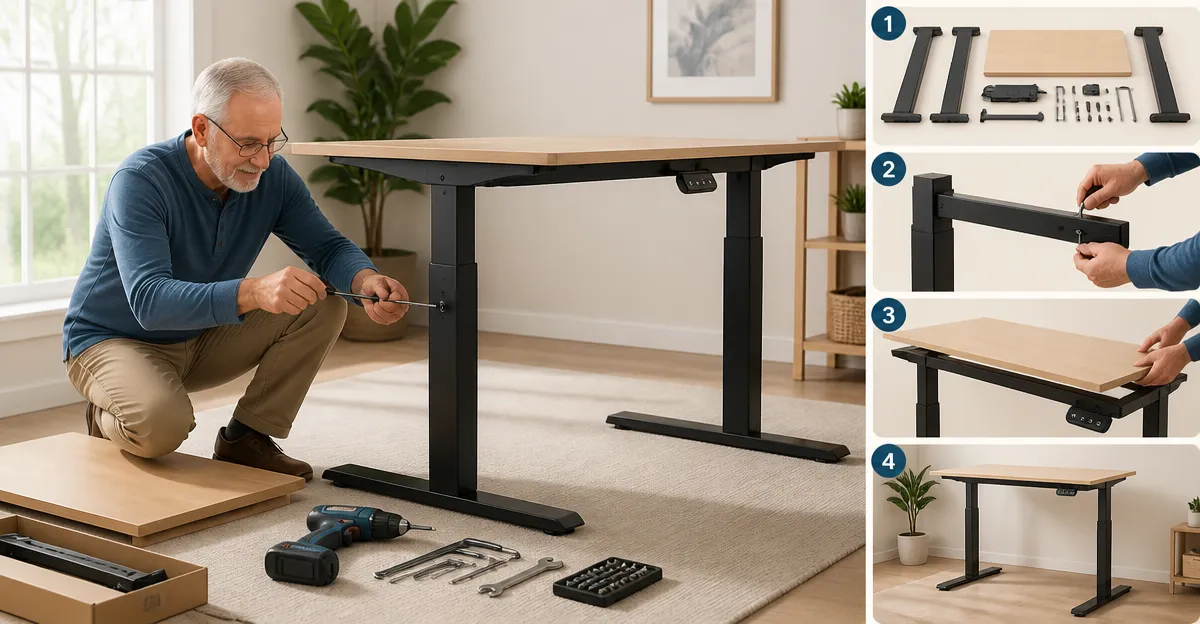
One can transform a traditional workspace into a health‑promoting environment by using a standing desk that adapts to senior needs. This guide explains how to assemble a senior‑friendly standing desk safely, efficiently, and with confidence. Readers will learn the essential tools, detailed assembly steps, and practical tips to ensure stability and ergonomic comfort. By following these instructions, one can enjoy an active workstation that supports mobility, reduces sedentary strain, and enhances productivity.
What You’ll Need
Before beginning the assembly, gather the following items: a flat, well‑lit work surface; a Phillips‑head screwdriver; a rubber mallet for gentle adjustments; a measuring tape; and optional safety gloves. The primary product recommended for this project is the OLIXIS Adjustable Mobile Walking Pad Desk, which provides a lightweight, height‑adjustable platform suited for senior users. Having these tools ready will streamline the process and reduce the likelihood of errors.
Step 1: Unbox and Inspect Components
Open the packaging carefully, allowing the cardboard to remain intact for recycling after use. Lay out each component on the work surface and compare them against the included parts list to verify completeness. Check the metal frame, desktop panel, locking casters, and hardware bag for any visible damage or missing screws. If any part appears defective, contact the supplier promptly before proceeding.
The OLIXIS Adjustable Mobile Walking Pad Desk arrives with all necessary hardware pre‑sorted, eliminating the need for additional purchases. Its ultra‑light design, weighing only 5.5 kg, makes handling the components straightforward for seniors, reducing strain during the inspection phase.
Step 2: Prepare the Workspace
Select a level area free of obstacles, preferably near a power outlet if electronic devices will be used. Place a soft protective mat to prevent scratches on both the floor and the desk’s wheelbase. Ensure adequate clearance of at least 60 cm behind the desk to accommodate the rolling motion of the casters. This preparation creates a safe environment for both assembly and future mobility.
Having a clear workspace also allows the OLIXIS desk’s locking wheels to engage properly, ensuring stability once the desk is positioned. The wide 27.95 in wheelbase distributes weight evenly, reducing the risk of wobble on uneven surfaces.
Step 3: Assemble the Frame – Part A
Begin by aligning the vertical support columns with the pre‑drilled holes on the base plate. Insert the provided bolts through the holes and tighten them using the Phillips‑head screwdriver until they are snug but not over‑tightened. Verify that the columns are perpendicular to the base to maintain structural integrity. This foundational step determines the desk’s overall sturdiness.
The frame’s modular design allows for easy adjustment, a feature that benefits seniors who may need to modify height settings later. The OLIXIS desk’s adjustable range from 27.95 in to 43.70 in accommodates a wide variety of sitting and standing positions without requiring additional tools.
Step 4: Assemble the Frame – Part B
Attach the cross‑brace between the two vertical columns using the supplied connector pins. Ensure the pins click securely into place, providing lateral reinforcement. Use the rubber mallet gently to seat the pins fully, avoiding any gaps that could compromise rigidity. Double‑check that the cross‑brace is centered to promote balanced weight distribution.
Because the OLIXIS desk is engineered for mobility, the cross‑brace is lightweight yet strong, contributing to a stable platform that can be moved without excessive effort. This balance between strength and portability is essential for seniors who may reposition the desk frequently.
Step 5: Attach the Desktop Surface
Place the desktop panel onto the assembled frame, aligning the pre‑drilled mounting holes with the frame’s screw inserts. Secure the desktop using the provided screws, tightening them evenly on both sides to prevent tilting. Verify that the surface sits flush with the frame, providing a level work area for laptops, monitors, and accessories. A level desktop reduces strain on the neck and eyes during prolonged use.
The OLIXIS Adjustable Mobile Walking Pad Desk offers a 31.5 in by 15.75 in work surface that accommodates typical office equipment while remaining compact enough for small apartments. Its spacious yet portable design ensures that seniors have ample room for essentials without overwhelming the workspace.
Step 6: Install the Locking Wheels
Insert each locking caster into the designated wheel sockets on the base, ensuring the pin‑lock mechanism aligns correctly. Press down firmly until the casters click into place, then test the lock by stepping on the wheel to confirm it remains stationary. Adjust the height of each wheel if necessary to achieve a uniform level across the desk. Proper wheel installation guarantees smooth movement and secure locking when stationary.
The OLIXIS desk’s lockable casters are a standout feature for senior users, providing both mobility and safety. When engaged, the wheels prevent unwanted drift, allowing the user to type or write without the desk shifting unexpectedly. This dual functionality supports active work habits while maintaining a stable environment.
Step 7: Adjust Height and Test Stability
Using the height‑adjustment lever, raise the desktop to the desired standing height, ensuring the adjustment mechanism clicks into each preset position. Test the desk by applying gentle pressure at the corners to confirm that there is no wobble. If any movement is detected, re‑tighten the frame bolts and verify the wheel locks are fully engaged. Conducting this test before regular use prevents accidents and enhances confidence.
The extensive height range of the OLIXIS Adjustable Mobile Walking Pad Desk accommodates seated work at 27.95 in and standing work up to 43.70 in, making it suitable for a broad spectrum of senior body types. This adaptability reduces the need for multiple desks, offering a single solution that grows with the user’s needs.
Step 8: Personalize and Add Accessories
Arrange ergonomic accessories such as a monitor riser, keyboard tray, and anti‑fatigue mat on the desktop to complete the workstation. Use cable management clips to organize power cords, minimizing trip hazards. Position a small lamp to provide adequate lighting without glare, supporting visual comfort during extended sessions. Personalization enhances both functionality and aesthetic appeal.
Because the OLIXIS desk is lightweight, adding accessories does not compromise its mobility. Seniors can easily reconfigure the layout as tasks change, preserving the flexibility that is central to an active work environment.
Tips & Pro Tips
Always tighten bolts in a diagonal pattern to distribute pressure evenly across the frame. This technique prevents warping and extends the lifespan of the desk. When adjusting height, move the lever slowly to avoid sudden shifts that could startle the user. Regularly inspect the locking mechanisms for dust buildup, cleaning them with a dry cloth to maintain reliable performance.
For seniors with limited grip strength, consider using a rubber‑grip screwdriver, which requires less force to turn screws. Additionally, place a non‑slip mat beneath the desk if the flooring is particularly smooth, providing extra friction when the wheels are unlocked.
Troubleshooting
Problem: The desk wobbles after height adjustment.
Solution: Re‑tighten all frame bolts, ensure the cross‑brace is centered, and verify that the wheels are locked securely. Adjust any uneven floor contact by placing a thin shim under the lower wheel.
Problem: The locking wheels do not engage fully.
Solution: Clean the pin‑lock mechanism of debris, then press the lock lever firmly until an audible click is heard. If the issue persists, replace the caster using the spare parts included in the package.
Conclusion
One has now learned how to assemble a senior‑friendly standing desk with confidence, safety, and precision. By following each step, verifying stability, and employing the recommended tools, seniors can enjoy an ergonomic workspace that promotes movement and reduces sedentary discomfort. The OLIXIS Adjustable Mobile Walking Pad Desk serves as an effective solution, offering height flexibility, portability, and secure locking mechanisms. Embrace the benefits of an active workstation and experience improved well‑being throughout the workday.
Products Mentioned in This Guide
Frequently Asked Questions
What tools are required to assemble a senior‑friendly standing desk?
You need a flat work surface, Phillips‑head screwdriver, rubber mallet, measuring tape, and optional safety gloves.
How can I ensure the desk is stable for senior users?
Tighten all bolts securely, use the rubber mallet for gentle adjustments, and verify levelness with a measuring tape before final tightening.
Is the OLIXIS Adjustable Mobile Walking Pad Desk suitable for seniors?
Yes, it’s lightweight, height‑adjustable, and designed with mobility and ergonomic comfort in mind for senior users.
What safety precautions should I take while assembling the desk?
Work on a well‑lit surface, wear safety gloves if desired, and double‑check all components for damage before starting.
How long does the assembly process typically take?
Most users can complete the assembly in 30‑45 minutes when all tools and parts are prepared.