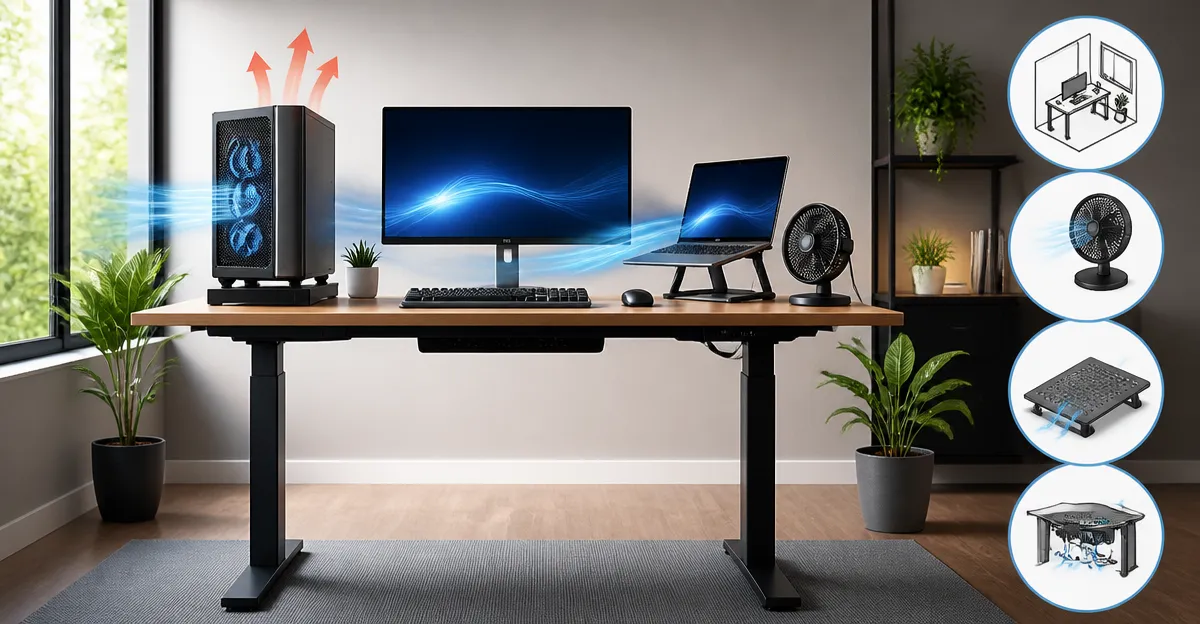
How to Position Your Standing Desk to Improve Electronics Ventilation: A Step‑by‑Step Guide to Optimize Airflow and Prevent Overheating
Introduction
Modern workspaces increasingly rely on powerful computers, multiple monitors, and a variety of peripherals that generate heat. When a standing desk is introduced, the geometry of the workspace changes, and airflow patterns must be reconsidered. This guide explains the principles of electronic ventilation, demonstrates how to position a standing desk for optimal cooling, and recommends accessories that enhance airflow without compromising aesthetics. Readers will finish with a clear action plan, a product comparison, and best‑practice tips to keep devices running efficiently.
Background and Context
Electronic components such as CPUs, GPUs, and power supplies operate within a narrow temperature envelope. Exceeding that envelope reduces performance, shortens lifespan, and can trigger thermal shutdowns. Air circulation is the most common method of heat removal; it relies on the displacement of warm air by cooler ambient air. In a traditional seated desk, the device base sits close to the floor, where air is often still. A standing desk raises the work surface, altering the convection currents and sometimes creating stagnant zones behind monitors or under the desk frame.
Understanding convection, the role of fans, and the impact of desk height is essential before rearranging a workspace. The following sections break down these concepts, then apply them to real‑world setups.
Understanding Airflow Around Electronics
Warm air rises naturally; therefore, heat generated by a computer tends to move upward toward the ceiling. If the path is obstructed—by a desk panel, a wall, or a dense cable bundle—air can become trapped, forming a hot pocket. The goal is to create a clear channel from the device intake to the exhaust, allowing fresh air to replace heated air continuously.
Two primary strategies achieve this:
- Passive ventilation: arranging components and furniture to encourage natural convection.
- Active ventilation: employing fans to force air movement where passive flow is insufficient.
Both strategies benefit from proper desk placement relative to walls, windows, and other heat sources. The next section details how to position a standing desk to maximize these effects.
Positioning Your Standing Desk for Optimal Ventilation
Begin by evaluating the room layout. Place the desk at least 30 cm (12 in) away from a solid wall to allow air to circulate behind the rear of the computer chassis. If a wall is unavoidable, consider a wall‑mounted vent or a thin gap for airflow.
Next, align the monitor stand and CPU tower so that intake vents face the open side of the desk. Many towers have front and side intakes; orienting the side intake toward the desk edge prevents heat buildup under the work surface.
Height matters as well. When the desk is set to a standing height (typically 100–115 cm), the computer’s exhaust vent may be closer to the ceiling, where warm air accumulates. Raising the desk slightly above the average seated height (around 75 cm) and adding a low‑profile fan can draw the hot air away before it pools.
Finally, keep cables organized. Bundled cables act as insulation, reducing airflow around power supplies and GPU connectors. Use zip ties or cable trays to maintain clear pathways.
Integrating Desk Fans for Enhanced Cooling
When passive measures are insufficient, a compact desk fan can provide the necessary airflow. The following products have been selected for their quiet operation, adjustable speed, and suitability for a standing‑desk environment.
The first recommendation is the Honeywell TurboForce Desk Fan. This 3‑speed fan pivots 90 degrees, allowing precise direction of airflow toward a computer’s intake vents. With a rating of 4.6 / 5 from over 131 000 reviews and a price of $18.79, it offers strong airflow while remaining 25 % quieter than comparable models. Its aerodynamic turbo design can be felt from up to 25 feet away, ensuring that even a large workstation benefits from its circulation.
For users seeking a USB‑powered solution, the Gaiatop USB Desk Fan provides a lightweight, under‑8‑ounce design that plugs directly into a laptop or power bank. It operates at less than 50 dB, includes three speed settings, and rotates vertically up to 30 degrees for targeted airflow. Priced at $7.99 and rated 4.5 / 5 from 27 890 reviews, it is an economical choice for portable cooling.
For a more robust, higher‑capacity option, the Amazon Basics Air Circulator Fan delivers three 7‑inch blades in a compact 6.3 × 11.1 × 10.9 in chassis. Its 90‑degree tilt and three‑speed knob let users fine‑tune airflow. At $18.79 and a 4.3 / 5 rating from 72 795 reviewers, it balances price and performance for larger desks.
When selecting a fan, consider the following criteria:
- Noise level (dB) – quieter fans are preferable for shared workspaces.
- Adjustability – pivoting heads and tilt mechanisms enable precise targeting.
- Power source – USB fans reduce cable clutter, while AC‑powered fans often provide higher airflow.
- Size and footprint – ensure the fan fits comfortably on the desk without obstructing monitors.
Choosing the Right Standing Desk
A stable, height‑adjustable desk forms the foundation of a well‑ventilated workstation. Two models stand out for their combination of electric adjustment, memory presets, and sturdy construction.
The ErGear Standing Desk offers a height range from 28.35 in to 46.46 in, a quiet lift motor, and four memory presets. Its steel frame and aerospace‑grade columns support up to 176 lb, ensuring stability even at full extension. Priced at $119.99 with a 4.5 / 5 rating from 11 995 reviews, it delivers durability for home offices and gaming setups.
The FEZIBO Standing Desk provides similar height adjustments (28.3 in‑46.5 in) and includes three memory presets. Its reinforced steel frame also supports 176 lb, and the motor operates below 45 dB. At $112.99 and a 4.5 / 5 rating from 4 837 reviews, it offers a slightly lower price point while maintaining quality. Both desks feature cable management trays, which help keep airflow unobstructed.
When deciding between these desks, evaluate the following factors:
| Feature | ErGear | FEZIBO |
|---|---|---|
| Price | $119.99 | $112.99 |
| Motor Noise | Quiet (unspecified dB) | Under 45 dB |
| Memory Presets | 4 positions | 3 positions |
| Frame Material | Alloy steel & aerospace columns | Reinforced steel |
| Weight Capacity | 176 lb | 176 lb |
| Assembly Time | ~40 min | ~30 min |
Both desks include low‑VOC materials, which improve indoor air quality—a complementary benefit to ventilation efforts.
Comparison and Selection Guide
Below is a concise matrix that matches user scenarios with the most appropriate fan and desk combination.
| Scenario | Recommended Desk | Recommended Fan |
|---|---|---|
| Budget‑focused home office | FEZIBO Standing Desk | Gaiatop USB Desk Fan |
| High‑performance gaming rig | ErGear Standing Desk | Honeywell TurboForce Desk Fan |
| Portable laptop workstation | Either desk (both have compact footprints) | Gaiatop USB Desk Fan (USB powered) |
| Quiet shared workspace | Either desk (both have low‑noise motors) | Amazon Basics Air Circulator Fan (quiet 3‑speed) |
Each pairing ensures that airflow reaches the device intake, while the desk’s stability prevents vibration that could affect cooling efficiency.
Best Practices & Tips
- Maintain a minimum 30 cm clearance behind the CPU tower to allow warm air to escape.
- Place a fan so that its airflow direction is orthogonal to the computer’s exhaust; this creates a cross‑draft that removes heat faster.
- Use the desk’s built‑in cable management tray to keep power cords away from fan intakes.
- Periodically clean dust filters and fan blades; dust reduces airflow by up to 30 %.
- Monitor component temperatures with software (e.g., HWMonitor) after rearranging the desk to verify improvements.
- Consider a small desktop humidifier in very dry climates; dry air can increase static electricity, which may affect sensitive electronics.
Frequently Asked Questions
- 1. Does raising my desk height increase the risk of overheating?
- Raising the desk brings the computer closer to the ceiling, where warm air accumulates. Counteract this by ensuring a clear path for exhaust air and adding a directed fan.
- 2. How far should a fan be placed from a CPU tower?
- Position the fan 15‑30 cm away, aimed at the intake vents. This distance provides sufficient airflow without creating turbulence.
- 3. Are USB‑powered fans strong enough for high‑performance PCs?
- USB fans like the Gaiatop model are suitable for modest heat loads (laptops, small form‑factor PCs). For larger towers, a mains‑powered fan such as the Honeywell TurboForce delivers greater airflow.
- 4. Can I use more than one fan on the same desk?
- Yes. Placing one fan at the rear intake and another at the front exhaust creates a push‑pull system that maximizes cooling.
- 5. How often should I clean my standing desk’s motor and fans?
- Inspect and clean dust from motor vents and fan blades every three months, or more frequently in dusty environments.
- 6. Does the desk’s material affect ventilation?
- Low‑VOC steel and wood do not impede airflow, but solid glass tops can reflect heat. Choose a desk with a breathable frame and avoid covering vents with decorative panels.
- 7. Will a standing desk reduce my electricity bill?
- Indirectly, yes. By improving airflow, components run cooler and require less fan speed, which can lower overall power consumption.
Conclusion
Optimizing ventilation for electronics on a standing desk involves a blend of strategic positioning, airflow management, and appropriate accessories. By keeping a clear gap behind the computer, using adjustable fans such as the Honeywell TurboForce Desk Fan or the Gaiatop USB Desk Fan, and selecting a stable, height‑adjustable desk like the ErGear or FEZIBO models, users can prevent overheating, extend device lifespan, and maintain a comfortable work environment. Implement the best‑practice tips, monitor temperatures, and adjust as needed to achieve consistent cooling performance.
Products Featured in This Guide
Honeywell TurboForce Desk Fan
Price: $18.79 | Rating: 4.6/5 (131,440 reviews)
Featured for its powerful 3‑speed motor, 90° pivoting head, and quiet operation, making it ideal for directing airflow toward computer intakes on a standing desk.
Gaiatop USB Desk Fan
Price: $7.99 | Rating: 4.5/5 (27,890 reviews)
Featured for its compact USB‑powered design, three speed settings, and low noise level, perfect for portable or space‑constrained setups.
ErGear Standing Desk
Price: $119.99 | Rating: 4.5/5 (11,995 reviews)
Featured for its robust steel frame, quiet lift motor, and four memory presets, providing a stable platform for high‑performance workstations.
FEZIBO Standing Desk
Price: $112.99 | Rating: 4.5/5 (4,837 reviews)
Featured for its reinforced steel construction, low‑noise motor, and affordable price, making it a strong alternative for budget‑conscious users.
Amazon Basics Air Circulator Fan
Price: $18.79 | Rating: 4.3/5 (72,795 reviews)
Featured for its compact 3‑blade design, 90° tilt, and three‑speed control, offering a versatile cooling solution for larger standing desks.